Loading
Get Ie Intreo Up80 2021-2026
How it works
-

Open form follow the instructions
-

Easily sign the form with your finger
-

Send filled & signed form or save
How to fill out the IE Intreo UP80 online
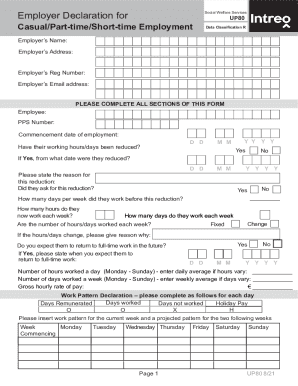
The IE Intreo UP80 form is essential for employers to report on casual, part-time, or short-time employment for social welfare purposes. This guide will provide you with clear and concise instructions to fill out the form accurately and effectively.
Follow the steps to complete the form with ease.
- Click ‘Get Form’ button to obtain the form and open it in the editor.
- Begin by filling in the employer's name and address in the designated fields.
- Provide the employer's registration number and email address as required.
- Enter the employee's information, including their PPS number and the date their employment commenced.
- Respond to the question regarding whether the employee’s working hours or days have been reduced by selecting 'Yes' or 'No'. If 'Yes', input the date the reduction took effect.
- State the reason for the reduction and indicate whether the employee requested this change.
- Fill in how many days per week the employee worked before the reduction and how many hours they work now.
- Provide information about the employee's work pattern and any expected changes, including whether they will return to full-time work and the anticipated date.
- Complete the section detailing wages paid and deductions made to the employee over the last 13 weeks, ensuring to fill in all relevant columns for gross pay, deductions, and net pay.
- Answer the questions about the reduction of gross earnings and whether Sunday is a day of employment, providing necessary details and rates if applicable.
- Finalize the form by signing and dating it, including the employer’s official stamp, if required.
- Once completed, save your changes, and consider downloading or printing the document for your records.
Start completing the IE Intreo UP80 form online today for seamless processing.
Related links form
Jobseeker and Supplementary Welfare Allowance payments are available in the Post Office from the specified payment date until close of business on Tuesday of the following week.