Loading
Get Au Hsbc Bank Hub009 2021-2026
How it works
-

Open form follow the instructions
-

Easily sign the form with your finger
-

Send filled & signed form or save
How to fill out the AU HSBC Bank HUB009 online
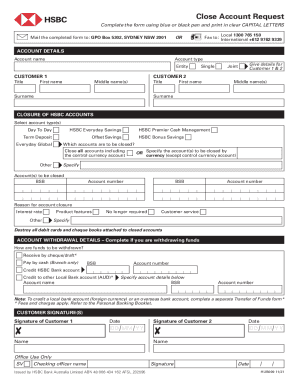
Filling out the AU HSBC Bank HUB009 form is an essential step for individuals looking to close their HSBC accounts. This guide provides a clear and supportive approach, ensuring that users can complete the form accurately and efficiently.
Follow the steps to successfully complete the form.
- Press the ‘Get Form’ button to access and open the AU HSBC Bank HUB009 in your preferred editor.
- Begin by providing your account details. Carefully select the account type and clearly write your account name and entity.
- Complete the customer information section. Indicate if you are completing this for a single customer or joint customers. Provide all required details such as titles, first names, middle names, and surnames for Customer 1 and Customer 2.
- In the section for closure of HSBC accounts, select the account types you wish to close and indicate whether you want to close all accounts or specify certain accounts by currency. Include distinct account details including BSB and account numbers.
- If applicable, complete the account withdrawal details section to indicate how you would like your funds to be withdrawn. Choose from options such as receiving funds by cheque or crediting an HSBC or other local bank account.
- Ensure that you sign and date the form in the customer signature section. Both Customer 1 and Customer 2 must print and sign their names by hand.
Take the next step in managing your bank account by completing the AU HSBC Bank HUB009 online today.
Related links form
The SWIFT/BIC code for HSBC is HSBCHKHH. However, HSBC uses different SWIFT/BIC codes for the different types of banking services it offers.