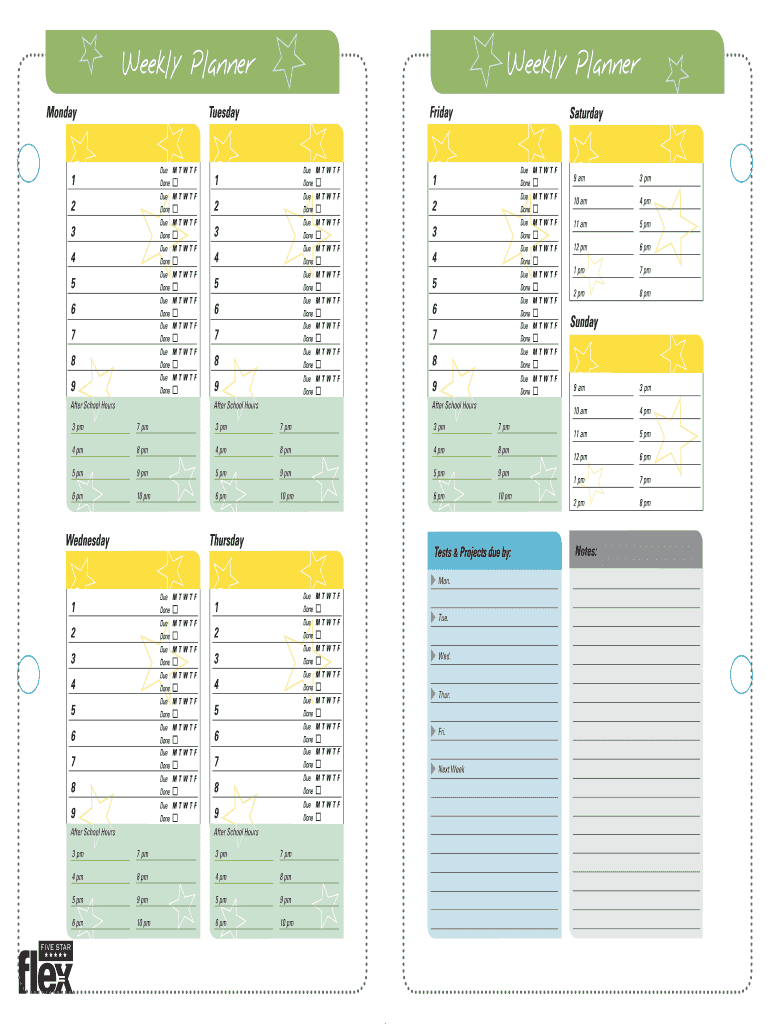
F 5 Done Due M T W T F 6 Done Due M T W T F 7 Done Due M T W T F 8 Done Due M T W T F 9 Done After School Hours Friday Due M T W T F 1 Done Due M T W T F 2 Done Due M T W T F 3 Done Due M T W T F 4 Done Due M T W T F 5 Done Due M T W T F 6 Done Due M T W T F 7 Done Due M T W T F 8 Done Due M T W T F 9 Done After School Hours Saturday Due M T W T F 1 Done Due M T W T F 2 Done Due M T W T F 3 Done Due M T W T F 4 Done Due M T W T F 5 Done Due M T W T F.
Loading

Open form follow the instructions

Easily sign the form with your finger

Send filled & signed form or save
How to use or fill out the Five Star Weekly Planner online
The Five Star Weekly Planner is a versatile digital tool designed to help users organize their weekly schedules effectively. This guide provides detailed instructions on how to accurately fill out the planner online, ensuring that you make the most of this productivity resource.
Follow the steps to complete your Five Star Weekly Planner online.
- Click the ‘Get Form’ button to access the planner and open it in your preferred online editor.
- Begin by populating the days of the week, starting with Monday through Sunday. Fill in any scheduled tasks, appointments, or reminders for each respective day. It is helpful to use specific time slots to ensure better organization.
- Utilize the 'Due' section to indicate deadlines for tasks. Mark each task with appropriate day(s) of the week to maintain clarity on when items are due.
- For tasks that have been completed, use the 'Done' checkbox associated with each entry to visually track your progress throughout the week.
- Input your 'Tests & Projects due' in the designated area for clarity on upcoming academic responsibilities. Similar to tasks, indicate specific due dates for these items.
- Fill in the 'Notes' section at the end of the form for additional reminders or insights that do not fit within the structured sections. Utilize this space to jot down thoughts or plans for the following week.
- Once you have completed filling out the planner, ensure to save your changes, and you can download or print the planner for your records. You may also choose to share it with others who may benefit from the information.
Get started on organizing your week by filling out your Five Star Weekly Planner online today!
Experience a faster way to fill out and sign forms on the web. Access the most extensive library of templates available.
Related content
Dec 19, 2008 — • The Five-Star Nursing Home Rating System was launched on December 18...
Sep 3, 2023 — A companion document to this Technical Users' Guide (Nursing Home...
Aug 5, 2021 — Category:5-star transients. From Tokyo Afterschool Summoners. Jump to...
Get answers to your most pressing questions about US Legal Forms API.
What should I put in my monthly vs weekly planner?
If your monthly planner breaks down your schedule at a macro-level, your weekly planner should break down your schedule at the micro-level. It should include: The individual tasks you'll need to complete to get closer to your monthly goals, and when you'll need to do them.
What should be in a weekly planner?
What to include in your weekly planner? Tasks for each day. Goals for the week or month. Special events or holidays. And habits or hobbies that help keep the daily routine organized. The planner should also reflect any important deadlines from work or school. If something has to be done on a certain date - write it down!
What is the most popular planner?
After surveying our staff, our best overall pick is the Happy Planner Vertical Layout Planner and our best budget pick is the Blue Sky Academic Year Weekly and Monthly Planner. Both planners have weekly and monthly layouts with enough space to write down deadlines, appointments, and other important reminders.
How do I set up a weekly monthly planner?
More Tips Set aside time to plan. Keep everything in the same planner. Always write everything down. Create a “Top Three” task list for busier days. Also include time commitments such as your meals/meal planning, workouts, etc. Utilize your planner's monthly calendar, too.
How do I make a weekly and monthly plan?
Weekly Planning Tips Start with your monthly spreads. Kickstart weekly planning by transferring important monthly dates to the two-page calendar spreads. Develop the habit of planning one week ahead. ... Schedule time buffers and self-care in your planner.
Are weekly or monthly planners better?
So to summarize: For long-range planning or if you don't have many appointments, use a monthly planner. For most planning needs, a weekly planner will probably work well for you. To record lots of details of your days, you'll want a daily planner.
What do you write in a monthly and weekly planner?
What to include in your weekly planner? Tasks for each day. Goals for the week or month. Special events or holidays. And habits or hobbies that help keep the daily routine organized. The planner should also reflect any important deadlines from work or school. If something has to be done on a certain date - write it down!
How do you fill out a monthly weekly planner?
How to Use a Monthly Planner Step 1: Decide how you're going to use your monthly planner. ... Step 2: Set goals in the two-page goals spread. ... Step 3: Add dates to your monthly calendar. ... Step 4: Use the note pages for jotting thoughts, list-making, bullet journaling, and more. ... Step 5: Customize your Monthly Planner.
Use professional pre-built templates to fill in and sign documents online faster. Get access to thousands of forms.
If you believe that this page should be taken down, please follow our DMCA take down process here.