Loading
Get Tx Cooperative Extension Volunteer Background Check Form 2005-2026
How it works
-

Open form follow the instructions
-

Easily sign the form with your finger
-

Send filled & signed form or save
How to fill out the TX Cooperative Extension Volunteer Background Check Form online
Filling out the TX Cooperative Extension Volunteer Background Check Form online is a crucial step for those wishing to volunteer with the organization. This guide provides a structured approach to help users navigate the form with confidence and clarity.
Follow the steps to complete the background check form online.
- Click ‘Get Form’ button to obtain the form and open it in the editor.
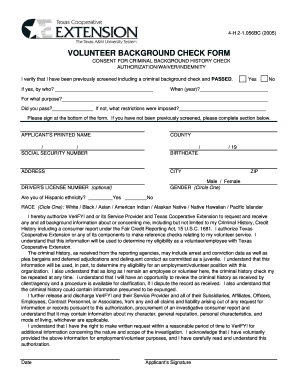
- Begin by reviewing the first section of the form, where you need to indicate if you have been previously screened and have passed the criminal background check. Provide details about the screening organization and the year it occurred.
- In the next section, fill out your personal information, including your printed name, county, social security number, birthdate, address, city, and ZIP code. The driver’s license number is optional.
- Indicate your gender by circling either 'Male' or 'Female' and respond to the question regarding Hispanic ethnicity by marking 'Yes' or 'No.'
- Select your race by circling one of the options provided: White, Black, Asian, American Indian, Alaskan Native, Native Hawaiian, or Pacific Islander.
- Review the authorization section thoroughly. By signing, you allow Texas Cooperative Extension or its service provider to access necessary background information. Ensure you understand the implications of this consent.
- At the bottom of the form, sign and date to confirm that you have provided accurate information and understand the background check process.
- Once completed, save any changes made to the form. You can then download, print, or share the form as needed.
Begin the process now and complete the TX Cooperative Extension Volunteer Background Check Form online.