Loading
Get University Of Southern California Application For Student Employment 2013-2026
How it works
-
Open form follow the instructions
-
Easily sign the form with your finger
-
Send filled & signed form or save
How to fill out the University Of Southern California Application For Student Employment online
Completing the University Of Southern California Application For Student Employment is a crucial step in securing a position on campus. This guide provides a clear, step-by-step process to assist you in accurately filling out the application online.
Follow the steps to successfully complete your application form.
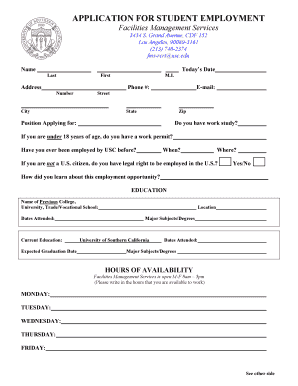
- Click ‘Get Form’ button to obtain the form and open it in the editor.
- Begin by entering your personal information. Fill in your name, address, phone number, and email address. Ensure that all details are accurate to avoid communication issues.
- Indicate the position for which you are applying. It is important to specify the job title clearly.
- Answer the questions regarding your work eligibility, such as work study status and age-related work permit requirements, ensuring you provide truthful and complete information.
- If applicable, fill in your previous employment history at USC, including dates of employment, nature of the job, and reasons for leaving to provide the employer with a comprehensive view of your background.
- List your educational background, including details about your previous colleges or vocational schools, dates attended, and the degree or major subjects pursued. Highlight your current education at the University of Southern California.
- Outline your hours of availability. Specify the times you can work for each weekday, aligning your schedule with the operational hours of Facilities Management Services.
- Detail your previous employment experiences. For each role, include the employer's name, supervisor's contact details, employment dates, and a brief description of your duties.
- Identify and check the skills you possess that are relevant to the position you are applying for. This may include software proficiency and other specialized skills.
- Review and verify all the information provided. Once satisfied, provide your signature and date the application to confirm its accuracy.
- Lastly, save any changes you have made to the form, and consider downloading, printing, or sharing the completed application as needed.
Complete your application online to take the first step towards your student employment opportunity.
Related links form
Students can find On-Campus Jobs, both work-study and non-work-study, through connectSC.
Industry-leading security and compliance
US Legal Forms protects your data by complying with industry-specific security standards.
-
In businnes since 199725+ years providing professional legal documents.
-
Accredited businessGuarantees that a business meets BBB accreditation standards in the US and Canada.
-
Secured by BraintreeValidated Level 1 PCI DSS compliant payment gateway that accepts most major credit and debit card brands from across the globe.