Loading
Get Oh T-610 1986-2026
How it works
-

Open form follow the instructions
-

Easily sign the form with your finger
-

Send filled & signed form or save
How to fill out the OH T-610 online
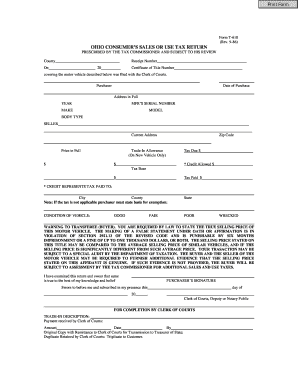
Filling out the OH T-610, the Ohio consumer’s sales or use tax return, can be streamlined by understanding its components and the information required. This guide provides step-by-step instructions to help you navigate through each section with ease.
Follow the steps to effectively complete the OH T-610 form online.
- Select the ‘Get Form’ button to access the form and open it in your editing interface.
- Begin by filling in the county name at the top of the form. This field is essential for identifying the jurisdiction.
- Date the form with the current date, ensuring accuracy when filing.
- Provide details regarding the purchaser, including their name, date of purchase, and full address.
- Fill in the seller's information such as name and address, ensuring it is clear and complete.
- If applicable, include the trade-in allowance; note this is only for new vehicles.
- Document any credit allowed, specifying the source of the tax paid.
- If the purchase qualifies for tax exemption, clearly state the basis for exemption in the provided section.
- Acknowledge the warning statement regarding the truthfulness of the selling price by reviewing it thoroughly.
- Complete the notary section if necessary, including the date and any signatures required.
- Finalize your document by saving changes, and proceed to download, print, or share the completed form as needed.
Begin filing the OH T-610 online today for a smoother transaction process.
In Ohio, the frequency of filing sales tax returns depends on the amount of tax you collect. Generally, businesses must file monthly, quarterly, or annually. The OH T-610 can provide clear guidelines on your filing schedule to keep you organized.