Loading
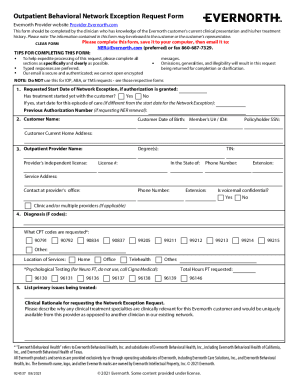
Get Evernorth 924537 2021-2026
How it works
-

Open form follow the instructions
-

Easily sign the form with your finger
-

Send filled & signed form or save
How to fill out the Evernorth 924537 online
Completing the Evernorth 924537 form online can streamline the process for requesting a network exception for outpatient behavioral health services. This guide will provide you with clear instructions on how to accurately fill out each section of the form to ensure your request is processed efficiently.
Follow the steps to complete the Evernorth 924537 form online.
- Click the ‘Get Form’ button to access the Evernorth 924537 form and open it for editing.
- Begin by filling in the requested start date for the network exception, if authorization is granted. Indicate whether treatment has already started with the customer. If yes, include the start date for this episode of care if it differs from the network exception start date. Provide the previous authorization number if you are requesting a renewal.
- In the next section, enter the customer’s name, date of birth, and member ID number. Be sure to also include the policyholder's Social Security number and the customer’s current home address.
- Next, enter the outpatient provider’s information. This includes the provider's name, degrees, independent license details, Tax Identification Number (TIN), and license number, along with the state of practice and contact information.
- Provide the diagnosis codes (F codes) relevant to the case. Specify the request for CPT codes, marking any that apply. Clearly indicate the location of services, whether at home, an office, or another setting.
- Outline the primary issues being treated and the clinical rationale for the network exception request. Describe why the requested clinical specialties are relevant and would only be available through this provider.
- Add any additional relevant information that may support the request. Remember not to attach extra pages.
- Finally, ensure to include your signature, date, and printed name as the requesting provider along with your fax number. Save the completed form to your computer.
- After saving, you can email the form to NER@Evernorth.com or fax it to 860-687-7329.
Start completing your documents online to streamline your request process.
Related links form
Cigna Healthcare and Evernorth Health Services. are both divisions of The Cigna Group This link will open in a new tab.. Formerly Cigna Corporation, The Cigna Group is a global health company dedicated to improving the health and vitality of those we serve.