Loading
Get It Fortune International Transport Multimodal Dangerous Goods Form 2002-2025
How it works
-

Open form follow the instructions
-

Easily sign the form with your finger
-

Send filled & signed form or save
How to fill out the IT Fortune International Transport Multimodal Dangerous Goods Form online
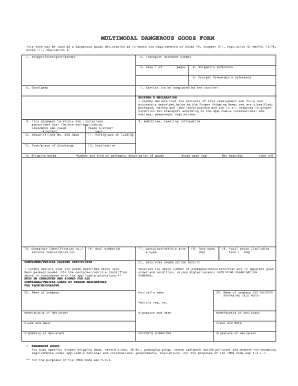
Filling out the IT Fortune International Transport Multimodal Dangerous Goods Form online is a crucial process for ensuring the safe transport of dangerous goods. This guide provides clear and detailed instructions to assist users in navigating each section and field of the form effectively.
Follow the steps to complete the form accurately and efficiently.
- Click ‘Get Form’ button to obtain the form and open it in the editor.
- In the 'Shipper/Consignor/Sender' section, enter the name and contact details of the sender of the shipment.
- Fill in the 'Transport document number' for tracking purposes.
- Indicate the total number of pages in the form by completing the 'Page 1 of ___ pages' field.
- Provide the 'Shipper’s reference' which helps in identifying the shipment.
- Enter the 'Freight forwarder’s reference' if applicable.
- Complete the 'Consignee' section with the details of the recipient.
- The 'Carrier' section is to be filled out by the carrier, who will need to include their information.
- In the 'Shipper’s declaration,' confirm the accuracy of the shipment's contents by entering the Proper Shipping Name and ensuring all items are classified, packaged, marked, and labeled appropriately.
- Select the applicable shipment type in the field labeled 'This shipment is within the limitations prescribed for:' and delete the non-applicable options (Passenger and Cargo, Cargo Aircraft, Aircraft Only).
- Fill in the 'Vessel/flight No. and date' for the transport vehicle used.
- Specify the 'Port/place of loading' to indicate where the shipment will commence.
- Indicate the 'Port/place of discharge' where the shipment will arrive.
- Provide necessary 'Shipping marks' that identify the shipment.
- In the 'Number and kind of packages; description of goods' section, detail the packaged goods.
- Input the 'Container identification no./vehicle registration no.' relevant to the shipment.
- List 'Seal number(s)' if applicable.
- Enter the 'Gross mass (kg)' of the shipment.
- Specify the 'Container/vehicle size & type' for transportation purposes.
- Document the 'Tare mass (kg)' and 'Net mass (kg)' for accurate weight reporting.
- Calculate and enter the 'Cube (m3)' of the shipment.
- Provide the 'Total gross (including tare) (kg)' for the entire shipment.
- In the 'Container/vehicle packing certificate' section, include the details of the packing/loading of goods.
- The 'Name of company' field should have the packing company's details.
- The 'Haulier’s name' and 'Name of company (of shipper preparing this note)' must be filled out.
- The 'Vehicle reg. no.', 'Name/status of declarant', and 'Signature and date' are also required fields.
- Ensure to include the 'Signature of declarant' for verification.
- In the 'Dangerous Goods' section, specify the Proper Shipping Name, hazard class, UN No., packaging group, and marine pollutant.
- Once all sections are completed, you can save changes, download, print, or share the form accordingly.
Complete your documents online for efficient processing!
This form may be used as a dangerous goods declaration as it meets the requirements of SOLAS 74, chapter VII, regulation 4; MARPOL 73/78, Annex III, regulation 4. 1 Shipper/Consignor/Sender. 2 Transport document number.
Industry-leading security and compliance
US Legal Forms protects your data by complying with industry-specific security standards.
-
In businnes since 199725+ years providing professional legal documents.
-
Accredited businessGuarantees that a business meets BBB accreditation standards in the US and Canada.
-
Secured by BraintreeValidated Level 1 PCI DSS compliant payment gateway that accepts most major credit and debit card brands from across the globe.