Loading
Form preview
  • US Legal Forms
  • Form Library
  • More Forms
  • More Multi-State Forms
  • Canada Transunion Investigations Form 2007

Get Canada Transunion Investigations Form 2007-2026

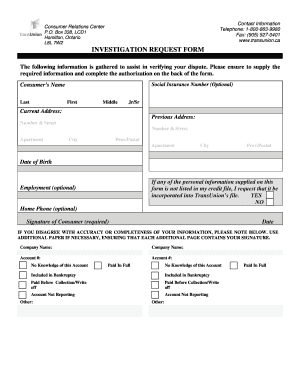
Mation is gathered to assist in verifying your dispute. Please ensure to supply the required information and complete the authorization on the back of the form. Social Insurance Number (Optional) Consumer s Name Last First Middle Jr/Sr Current Address: Previous Address: Number & Street Number & Street Apartment City Prov/Postal Apartment City Prov/Postal Date of Birth If any of the personal information supplied on this form is not listed in my credit file, I request that it be incor.

How it works

  1. Open form

    Open form follow the instructions

  2. Easily sign form

    Easily sign the form with your finger

  3. Share form

    Send filled & signed form or save

How to fill out the Canada TransUnion Investigations Form online

Completing the Canada TransUnion Investigations Form is an essential step in addressing inaccuracies in your credit report. This guide provides clear, step-by-step instructions to ensure you fill out the form accurately and efficiently, helping you navigate the online submission process with confidence.

Follow the steps to successfully complete the form online.

  1. Click ‘Get Form’ button to obtain the form and open it in the editor.
  2. Begin by entering your personal details in the required fields. For the Consumer’s Name, provide your last name, first name, and middle name along with any suffixes such as Jr or Sr.
  3. Fill in your current address, including the number and street, apartment (if applicable), city, and province/postal code.
  4. If you have a previous address, provide that information as well in the designated section.
  5. Enter your date of birth accurately. This is necessary to verify your identity.
  6. Indicate whether the personal information supplied on this form is to be included in TransUnion’s file by selecting ‘YES’ or ‘NO’.
  7. (Optional) Provide your employment information and home phone number if you choose.
  8. Sign the form in the designated area to confirm that the information provided is true and accurate.
  9. Specify any inaccuracies in your credit report. List the company names, account numbers, and the nature of your dispute, using additional pages if necessary, ensuring that each page contains your signature.
  10. Make any additional comments you wish to include regarding your request.
  11. Once all fields are filled out, save your changes. You can then download, print, or share the completed form as needed.

Take the first step towards addressing your credit report concerns by completing the Canada TransUnion Investigations Form online today.

Get form

Experience a faster way to fill out and sign forms on the web. Access the most extensive library of templates available.
Get form

Related content

TransUnion
Businesses embed our solutions into their process workflows to acquire new customers...
Learn more
Wendy's, December 21, 2007
Dec 21, 2007 — We are writing to advise you of a recent incident involving the theft of...
Learn more
Genworth MI Canada Inc. 2015 Annual Report
Dec 15, 2015 — Performance is measured by a number of factors, including top-line...
Learn more

Related links form

CT DRS CT-1096 2009 CT DRS CT-1120 2018 CT DRS CT-1120 2016 CT DRS CT-1120 2015

Questions & Answers

Get answers to your most pressing questions about US Legal Forms API.

Contact support

Credit Karma offers both free monitoring services for TransUnion and Equifax. Credit Karma also gives you the option to dispute any errors you see on your credit report from TransUnion and Equifax.

If you identify an error on your credit report, you should start by disputing that information with the credit reporting company (Experian, Equifax, and/or Transunion). You should explain in writing what you think is wrong, why, and include copies of documents that support your dispute.

Lenders provide updates on your account activity to at least one of two credit bureaus in Canada —TransUnion and Equifax. Since lenders do not necessarily report to both bureaus, the information on your credit reports may vary.

If you have completed the dispute process and you still can't get the credit bureaus to correct your report, the FCRA allows you to sue TransUnion. In most cases we are able to remove the false credit, get compensation for the consumer, and have the other side pay all the fees and costs.

If you find any inaccuracies on your report, you'll have to gather documentation to substantiate your claim such as receipts, credit card statements, and any other relevant documents. From there, you can file a dispute with each credit bureau who reported the inaccuracy using Equifax and TransUnion's online forms.

You submit an investigation request (dispute). If you believe that an item contained in your TransUnion credit report is inaccurate or needs updating, send TransUnion a request for investigation or request to change information. You can start your investigation online. You can also submit a dispute by phone or mail.

There are three ways you can launch a dispute into item(s) on your report: Online: Click Here to visit our self-service website. Over the telephone: simply call 1-800-663-9980 to reach one of our TransUnion representatives for assistance with your inquiry.

You can send disputes by mail to TransUnion Consumer Solutions, P.O. Box 2000, Chester, PA 19016-2000. TransUnion recommends including the following in your dispute letter: Your Social Security number and date of birth. Your current address.

Get This Form Now!

Use professional pre-built templates to fill in and sign documents online faster. Get access to thousands of forms.
Get form
If you believe that this page should be taken down, please follow our DMCA take down processhere.
Get Canada TransUnion Investigations Form
Get form
  • Adoption
  • Bankruptcy
  • Contractors
  • Divorce
  • Home Sales
  • Employment
  • Identity Theft
  • Incorporation
  • Landlord Tenant
  • Living Trust
  • Name Change
  • Personal Planning
  • Small Business
  • Wills & Estates
  • Packages A-Z
  • Affidavits
  • Bankruptcy
  • Bill of Sale
  • Corporate - LLC
  • Divorce
  • Employment
  • Identity Theft
  • Internet Technology
  • Landlord Tenant
  • Living Wills
  • Name Change
  • Power of Attorney
  • Real Estate
  • Small Estates
  • Wills
  • All Forms
  • Forms A-Z
  • Form Library
  • Legal Hub
  • About Us
  • Help Portal
  • Legal Resources
  • Blog
  • Affiliates
  • Contact Us
  • Delete My Account
  • Site Map
  • Industries
  • Forms in Spanish
  • Localized Forms
  • State-specific Forms
  • Forms Kit
  • Real Estate Handbook
  • All Guides
  • Notarize
  • Incorporation services
  • For Consumers
  • For Small Business
  • For Attorneys
  • USLegal
  • FormsPass
  • pdfFiller
  • signNow
  • altaFlow
  • DocHub
  • Instapage
Form Packages
  • Adoption
  • Bankruptcy
  • Contractors
  • Divorce
  • Home Sales
  • Employment
  • Identity Theft
  • Incorporation
  • Landlord Tenant
  • Living Trust
  • Name Change
  • Personal Planning
  • Small Business
  • Wills & Estates
  • Packages A-Z
Form Categories
  • Affidavits
  • Bankruptcy
  • Bill of Sale
  • Corporate - LLC
  • Divorce
  • Employment
  • Identity Theft
  • Internet Technology
  • Landlord Tenant
  • Living Wills
  • Name Change
  • Power of Attorney
  • Real Estate
  • Small Estates
  • Wills
  • All Forms
  • Forms A-Z
  • Form Library
Customer Service
  • Legal Hub
  • About Us
  • Help Portal
  • Legal Resources
  • Blog
  • Affiliates
  • Contact Us
  • Delete My Account
  • Site Map
  • Industries
  • Forms in Spanish
  • Localized Forms
  • State-specific Forms
  • Forms Kit
Legal Guides
  • Real Estate Handbook
  • All Guides
Prepared for you
  • Notarize
  • Incorporation services
Our Customers
  • For Consumers
  • For Small Business
  • For Attorneys
Our Sites
  • USLegal
  • FormsPass
  • pdfFiller
  • signNow
  • altaFlow
  • DocHub
  • Instapage
Social Media
Call us now toll free:
+1 833 426 79 33
As seen in:
© Copyright 1999-2026 airSlate Legal Forms, Inc. 17 Station Street, Suite 303, Brookline, MA 02445
  • Your Privacy Choices
  • Terms of Service
  • Privacy Notice
  • Content Takedown Policy
  • Bug Bounty Program