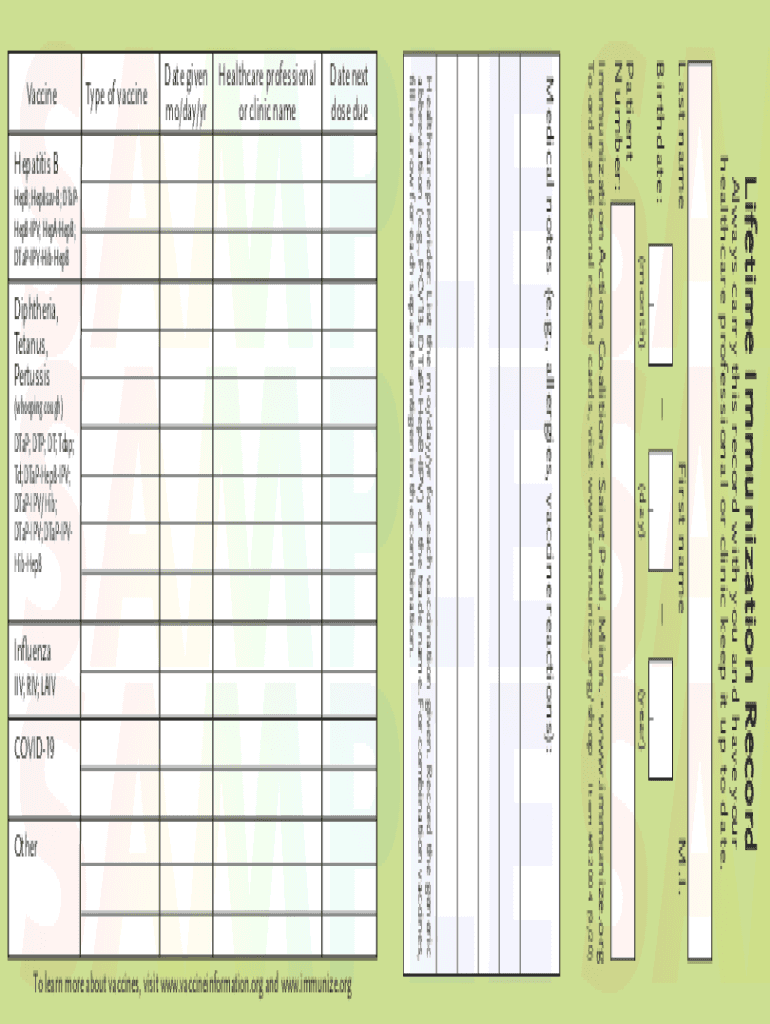
Lifetime Immunization Record(month)First name(day)(year)M.I. Always carry this record with you and have your healthcare professional or clinic keep it up to date. Last name Birthdate: Patient Number: Item.
Loading

Open form follow the instructions

Easily sign the form with your finger

Send filled & signed form or save
How to fill out the Immunize R2004 online
Completing the Immunize R2004 form online is a straightforward process that ensures your vaccination history is accurately recorded. This guide will provide step-by-step instructions to help you navigate each section of the form effectively.
Follow the steps to complete your Immunize R2004 form with ease.
- Click ‘Get Form’ button to access the Immunize R2004 form and open it in your preferred editor.
- Start by entering your personal information. Fill in your first name, middle initial, and last name in their respective fields. Ensure all entries are accurate for proper identification.
- Next, provide your birthdate by selecting the month, day, and year from the provided dropdowns. This information is essential for tracking your immunization schedule.
- Locate the section titled 'Healthcare provider.' This area requires you to list the date for each vaccination given, including the type of vaccine administered along with its generic or trade name. Record the correct information to maintain an updated immunization record.
- Continue completing the form by listing additional immunizations received. For each, include the date given and the name of the healthcare professional or clinic administering the vaccine. Use the same format to enter the date next dose is due.
- If applicable, use the medical notes section to document any allergies or vaccine reactions that may be relevant to your health records.
- After filling in all necessary fields, review the form for accuracy. Once confirmed, you can save your changes, download a copy for your records, print the form, or share it with your healthcare provider.
Complete your Immunize R2004 form online today to maintain accurate medical records.
Experience a faster way to fill out and sign forms on the web. Access the most extensive library of templates available.
Related content
Immunization Action Coalition • Saint Paul, Minn. • www.immunize.org. To order...
by I Should — ____ R2004 Lifetime immunization record cards ... ____ V2020 Videotape:...
by CP Quinn · 2016 · Cited by 12 — vaccine adsorbed immune correlates of protection in...
Get answers to your most pressing questions about US Legal Forms API.
What is the name of the Tdap vaccine for adults?
Tetanus, Diphtheria, and Pertussis (Tdap) Vaccines There are two Tdap vaccines used in the United States: ® and ®. FDA approved both ® and ® for use during pregnancy.
What is the diagnosis code for Tdap vaccine?
90714 Tetanus and diphtheria toxoids (Td) adsorbed, preservative free, when administered to individuals 7 years or older, for intramuscular use 90715 Tetanus, diphtheria toxoids and acellular pertussis vaccine (Tdap), when administered to individuals 7 years or older, for intramuscular use 90716 Varicella virus vaccine ...
What is the diagnosis code for hepatitis B vaccine?
The ICD-10-CM diagnosis code required for billing is Z23 - Encounter for immunization. Providers must bill with HCPCS code 90739 - Hepatitis B vaccine (HepB), adult dosage, two dose schedule, for intramuscular use.
What is the age for CPT 90715?
“Code for TDAP above 18 years will be: 90715 Tetanus, diphtheria toxoids and acellular pertussis vaccine (Tdap), when administered to individuals 7 years or older, for intramuscular use.
What is the CPT code for tetanus Tdap?
What is a CPT® code? The Current Procedural Terminology (CPT®) codes offer doctors and health care professionals a uniform language for coding medical services and procedures to streamline reporting, increase accuracy and efficiency.
What is the CPT code for Tdap vaccine for adults?
Tetanus, Diphtheria and Pertussis vaccines (CPT codes 90702, 90714, and 90715) Diagnosis codes must be coded to the highest level of specificity.
What are the CPT codes for Tdap vaccine?
90714 Tetanus and diphtheria toxoids (Td) adsorbed, preservative free, when administered to individuals 7 years or older, for intramuscular use 90715 Tetanus, diphtheria toxoids and acellular pertussis vaccine (Tdap), when administered to individuals 7 years or older, for intramuscular use 90716 Varicella virus vaccine ...
What is the ICD-10 code for immunization administration?
Z23 is the ICD-10 code that identifies an encounter for immunization(s).
Use professional pre-built templates to fill in and sign documents online faster. Get access to thousands of forms.
If you believe that this page should be taken down, please follow our DMCA take down process here.