Get Co Cr 0100ap 2018-2026
How it works
-

Open form follow the instructions
-

Easily sign the form with your finger
-

Send filled & signed form or save
How to fill out the CO CR 0100AP online
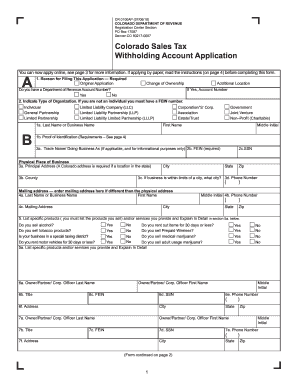
The CO CR 0100AP is the Colorado Sales Tax Withholding Account Application form, essential for businesses operating in Colorado. This guide will provide you with clear, step-by-step instructions on how to complete the form online, ensuring that you understand each section and requirement effectively.
Follow the steps to fill out the CO CR 0100AP online successfully.
- Click ‘Get Form’ button to obtain the form and open it in the editor.
- Begin by indicating the reason for filing the application in Section A. Choose from options such as Original Application, Change of Ownership, or Additional Location. If you have an existing Department of Revenue Account Number, check 'Yes' and enter the number.
- In Section B, specify the type of organization by selecting one of the options provided. If applicable, include your Federal Employer Identification Number (FEIN). Fill in your name or business name as required, and provide proof of identification if necessary.
- Complete the physical address fields in Section B, ensuring to provide a valid Colorado address, city, and county of your business location.
- If your mailing address differs from your physical address, complete Section 4 with the necessary mailing information.
- Detail the specific products or services your business provides in Section 5, marking any relevant boxes that pertain to your business type and offerings.
- In Sections 6 and 7, provide information about owners, partners, or corporate officers. Include names, titles, FEIN, and contact details.
- If applicable, complete Section 8 with information about any prior taxpayer name if you are acquiring an existing business.
- Complete Section C concerning sales tax, indicating your seasonal business status and filing frequency based on your expected sales.
- In Section D, provide information relevant to wage withholding requirements if you will have employees.
- Proceed to Section E to determine your fees and enter the necessary amounts, ensuring to include any deposits or license fees.
- Finally, Section F requires a signature along with the title and date from the person completing the application. Review all entries to ensure accuracy before submission.
- Once all sections are complete, save your changes, download the completed form, and ensure to print or share as needed.
Complete your CO CR 0100AP online today to expedite your business registration!
Your Colorado Electronic Funds Transfer (EFT) number is typically found on your tax invoice or correspondence from the Colorado Department of Revenue. If you cannot find it, consider logging into your Colorado revenue online account, where such information is often available. If CO CR 0100AP is relevant to your situation, our solutions can help clarify any issues regarding your EFT number.