Loading
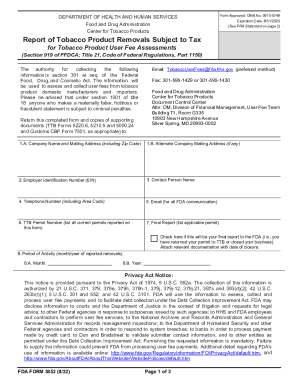
Get Hhs Fda Form 3852 2022-2026
How it works
-

Open form follow the instructions
-

Easily sign the form with your finger
-

Send filled & signed form or save
How to fill out the HHS FDA Form 3852 online
This guide provides clear instructions for successfully filling out the HHS FDA Form 3852 online. It is designed to assist users at all experience levels in navigating the form's components.
Follow the steps to complete the HHS FDA Form 3852 online.
- Press the ‘Get Form’ button to access the online form in the editing tool.
- In section 1.A, enter the company name and mailing address, including the zip code. If you have an alternate mailing address, provide that in section 1.B.
- Input the Employer Identification Number (EIN) in section 2.
- Fill out the name of the contact person in section 3 and their telephone number including the area code in section 4.
- Provide an email address for all FDA communication in section 5.
- In section 6, list all current TTB permits that are being reported.
- If this is your final report to the FDA, check the appropriate box in section 7 and attach supporting documentation indicating the closure of the permit.
- In section 8, record the month and year of the reported removals in sections 8.A and 8.B, respectively.
- Enter the removal volume and excise taxes for each tobacco product type in the corresponding fields under the manufacturer and importer activity sections, ensuring accuracy in the reported amounts.
- In section 15, provide certification by printing the name of the authorizing individual in field 15.A, their title in 15.B, and obtaining their signature in 15.C along with the date prepared in 15.D.
- Once completed, save your changes. You can then download, print, or share the form as needed.
Complete your HHS FDA Form 3852 online today.
Fact: The FDA does not “approve” tobacco products for sale in the U.S. More Information: To legally sell or distribute a new tobacco product in the U.S., manufacturers must receive authorization from the FDA.