00 Due date: April 15, 2016 - Attach a copy of all applicable schedules and forms to this return. For a faster refund, le your return electronically at www.ct.gov/DRS/TSC and choose direct deposit. Form CT-1040NR/PY Page 2 of 4 (Rev. 12/15) NRPY 00 15W 02 9999 Your Social Security Number 19. Enter amount from Line 18. 3 W-2 and 1099 Information Only enter information from your W-2, Schedule CT K-1, and 1099 forms if Connecticut income tax was withheld. .00 19. Column A - Emp.
Loading

Open form follow the instructions

Easily sign the form with your finger

Send filled & signed form or save
How to fill out the CT DRS CT-1040NR/PY online
Filling out the CT DRS CT-1040NR/PY form online can be a straightforward process if you follow the correct steps. This guide will provide you with essential information and clear instructions to help you navigate through each section of the form effectively.
Follow the steps to complete your CT-1040NR/PY form with ease.
- Click 'Get Form' button to obtain the CT DRS CT-1040NR/PY form and access it online.
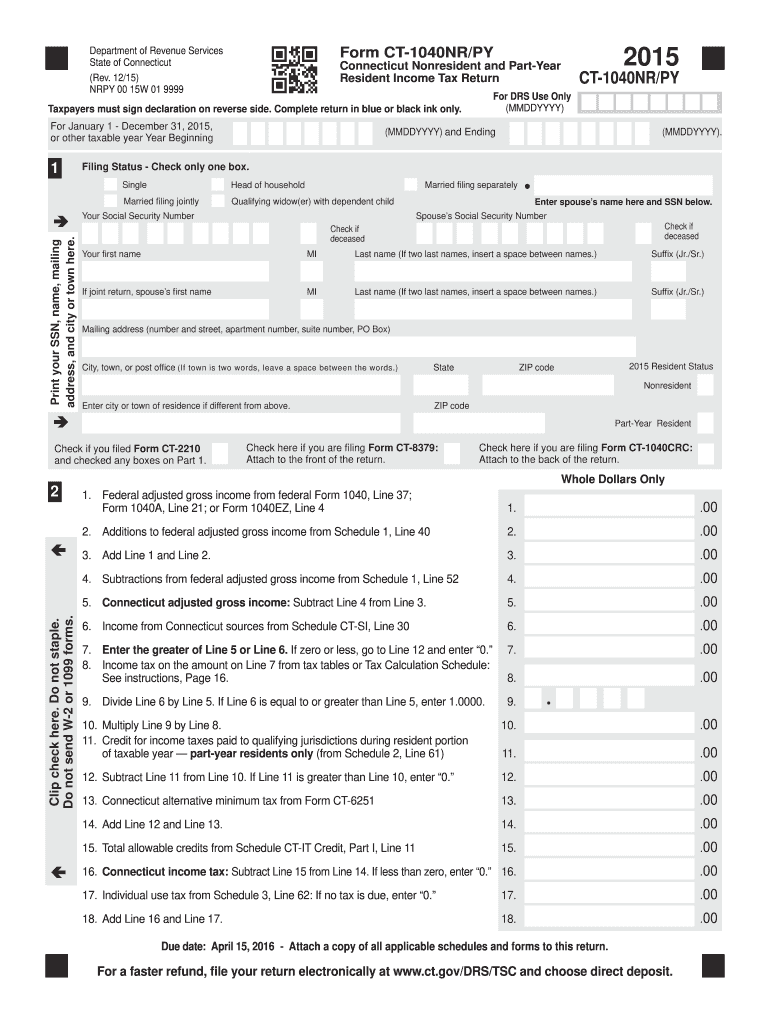
- Choose your filing status by checking only one box: single, head of household, married filing jointly, qualified widow(er) with dependent child, or married filing separately. Ensure you accurately select the status that applies to you.
- Input your social security number, your name, and your mailing address, ensuring all entries are accurate and complete.
- Indicate your resident status for the tax year, identifying yourself as a nonresident or part-year resident. If your residence differs from the provided address, enter the city or town of your current residence.
- Report your federal adjusted gross income as indicated on the relevant lines of your federal tax return. Use the provided sections to document any state-specific modifications.
- Calculate your Connecticut adjusted gross income by applying any necessary subtractions from federal adjusted gross income as detailed on Schedule 1.
- Complete the income tax calculation by following the guidelines specified on the form, making sure to reference the applicable tax tables or schedules.
- Enter any Connecticut income tax withheld, with specific details outlined in the sections for reporting W-2 and 1099 information.
- If applicable, fill out the sections related to the contributions you wish to make to designated charities, following the instructions provided on Schedule 4.
- Finally, review all your entries for accuracy, sign the declaration on the reverse side, and ensure you retain a copy for your records. You can now save changes, download, print, or share your completed form.
Complete your CT DRS CT-1040NR/PY form online to ensure a seamless filing experience.
Experience a faster way to fill out and sign forms on the web. Access the most extensive library of templates available.
Related content
File and pay Form CT‑1040NR/PY electronically using myconneCT at...
CT-1040 NR/PY, Connecticut Nonresident and Part-Year Resident Income Tax. Prepare and file...
Jun 1, 2016 — The motors are CSA approved for operation at a frequency inverter with...
Get answers to your most pressing questions about US Legal Forms API.
Who do I write my CT state tax check to?
If you are paying your state taxes, ensure that your check is made out to the Connecticut Department of Revenue Services. Include your tax identification number on the check and make sure to indicate it's for the CT DRS CT-1040NR/PY filing. Properly directing your payment helps avoid delays or issues with your tax account. For more guidance on payment processes, companies like uslegalforms can be incredibly helpful.
Who must file CT 1040NR?
Individuals who earn income in Connecticut and do not live there must file the CT 1040NR. This includes those who have jobs in the state or receive income from Connecticut sources. Additionally, if you meet the income thresholds, you are obligated to file this form. For anyone needing more information on this requirement, uslegalforms can provide detailed assistance.
What is the minimum income you have to declare?
The minimum income you need to declare depends on your filing status and age, much like the 1040NR requirements. Generally, if your income surpasses a predetermined limit, you should file a return. The CT DRS CT-1040NR/PY form must be used to report your income accurately and fulfill tax obligations. To navigate these rules effectively, companies like uslegalforms can guide you through the process.
Who is exempt from filing 1040NR?
Certain individuals are exempt from filing the 1040NR, such as those with very low income levels or specific visa classifications. Additionally, students and scholars on certain types of visas may also not need to file. However, if you have income, it's best to check whether you meet the conditions for exemption to avoid any issues with taxation. Consulting resources like uslegalforms can simplify understanding your filing requirements.
What is the minimum income for 1040NR?
The minimum income requirement for filing the 1040NR typically varies based on your filing status and age. Generally, you must file if your income exceeds a specific threshold, which is adjusted annually. Knowing these requirements is crucial, as the CT DRS CT-1040NR/PY form is necessary for filing your nonresident tax return. If you're unsure about your obligations, uslegalforms can help clarify these income thresholds.
What is the nonresident tax form for CT?
The nonresident tax form for Connecticut is the CT DRS CT-1040NR/PY. This form is specifically designed for individuals who do not reside in Connecticut but earn income from sources within the state. It's important to complete this form accurately to ensure compliance with state tax laws and avoid potential penalties. If you need assistance, platforms like uslegalforms can provide guidance on filling out the CT DRS CT-1040NR/PY correctly.
Can you file CT state taxes online?
Absolutely, you can file CT state taxes online through the CT Department of Revenue Services (CT DRS) website. Online filing provides a convenient method to submit your tax returns while ensuring accuracy and efficiency. By filing online, you can also track your return status easily. For a guided online filing process, consider using resources from uslegalforms to navigate CT DRS CT-1040NR/PY.
Can CT 1040X be filed electronically?
Yes, you can file CT 1040X electronically, making it easier to correct any previous CT tax returns. E-filing provides a speedy way to submit your amended returns while ensuring you meet submission deadlines. Quick corrections ensure you stay compliant with the Connecticut taxation rules. Check out options on uslegalforms for a seamless electronic filing experience.
Who must file a CT estate tax return?
A CT estate tax return is necessary for estates exceeding a specific value, which is defined by Connecticut law. Executors of estates must file to report the value of all assets owned by the deceased at the time of death. Understanding when to file ensures compliance with state estate tax regulations. Resources on uslegalforms can support you through the filing process and help you determine whether you must file.
Do I have to file a CT nonresident tax return?
If you earned income from Connecticut sources while being a non-resident, you must file a CT nonresident tax return. This requirement includes income from wages, business, or rental properties. Filing this return allows you to report your visit-related earnings while complying with state taxation rules. Utilize resources on uslegalforms to ensure you understand your obligations regarding the CT DRS CT-1040NR/PY.
Use professional pre-built templates to fill in and sign documents online faster. Get access to thousands of forms.
If you believe that this page should be taken down, please follow our DMCA take down process here.
This form is available in several versions. Select the version you need from the drop-down list below.