Loading
Get Ny Ppf 40 - New York City 2013-2026
How it works
-

Open form follow the instructions
-

Easily sign the form with your finger
-

Send filled & signed form or save
How to fill out the NY PPF 40 - New York City online
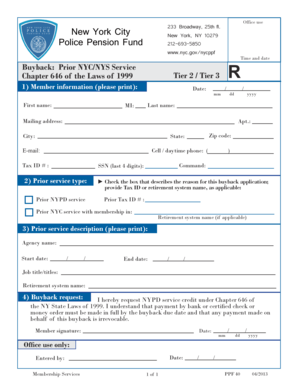
The NY PPF 40 form is essential for requesting buyback of prior New York City or New York State service for members of the Police Pension Fund. This guide will walk you through each section of the form to ensure a smooth and accurate completion process.
Follow the steps to fill out the NY PPF 40 form online.
- Click the ‘Get Form’ button to access the form and open it in the editor.
- Begin by providing your member information in Section 1. Fill in your first name, last name, mailing address, apartment number, city, zip code, state, email, cell or daytime phone number, tax ID number, and the last four digits of your Social Security number.
- In Section 2, select the type of prior service you are applying for by checking the appropriate box. If applicable, provide your prior tax ID number or the name of the retirement system.
- Proceed to Section 3 to describe your prior service. Print the agency name, start and end dates of service, job title(s), and retirement system name if applicable.
- In Section 4, state your request for NYPD service credit under Chapter 646 of the NY State Laws of 1999. Ensure you are aware that payment must be made in full by the buyback due date and that any payment made is irrevocable. Sign and date the form.
- Once you have completed all sections, review the form for accuracy. You can then save changes, download a copy, print it for your records, or share it as needed.
Complete your NY PPF 40 form online to ensure a timely submission.
Related links form
The FMLA requires employers with 50 or more employees to provide their workers up to 12 weeks of unpaid time off annually for a serious health condition, to care for a family member with a serious health condition, to care for a new child (biological or adopted), or to handle certain family and military matters.