Loading
Get Wa Coulee-hartline School District Medication Authorization 2006-2026
How it works
-

Open form follow the instructions
-

Easily sign the form with your finger
-

Send filled & signed form or save
How to fill out the WA Coulee-Hartline School District Medication Authorization online
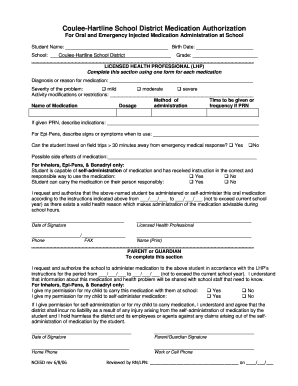
This guide provides essential information on completing the WA Coulee-Hartline School District Medication Authorization form online. Following these steps will ensure that you fill out the form accurately and efficiently, helping to address your child's medication needs at school.
Follow the steps to complete the form easily.
- Click 'Get Form' button to obtain the form and access it in the online editor.
- Enter the student's name and birth date in the respective fields. It's important to ensure that this information is accurate for proper identification.
- Fill in the school name as 'Coulee-Hartline School District' and the grade of the student in the designated areas.
- Complete the Licensed Health Professional (LHP) section by indicating the diagnosis or reason for the medication. Make sure to state this clearly.
- Select the severity of the problem by checking the relevant box: mild, moderate, or severe.
- Describe any activity modifications or restrictions that may apply to the student in the provided space.
- List the name of the medication in the appropriate field, along with the dosage, method of administration, and frequency of administration if it is given as needed (PRN).
- If the medication is PRN, describe the indications for its use in the specified area.
- For Epi-Pens, indicate the signs or symptoms that would warrant the use of the medication.
- Address whether the student can travel on field trips that go more than 30 minutes away from emergency medical response by selecting 'Yes' or 'No.'
- List possible side effects of the medication to inform the school staff.
- For certain medications (inhalers, Epi-Pens, & Benadryl), indicate if the student is capable of self-administration and if they can carry the medication responsibly by checking 'Yes' or 'No' for each.
- As the LHP, authorize the administration of the above-named medication by signing and dating the signature line provided.
- In the parent or guardian section, provide your authorization for the school to administer the medication, including the period of authorization.
- If applicable, indicate whether permission is granted for the student to carry their medication and self-administer it by selecting 'Yes' or 'No.'
- Acknowledge the district's liability waiver related to self-administration and sign and date the signature line.
- Finally, review the completed form for accuracy, then save any changes, download, print, or share the form as required.
Complete the WA Coulee-Hartline School District Medication Authorization form online today to ensure your child receives the necessary care at school.