Loading
Get Dod Tamc Form 922 2009-2026
How it works
-

Open form follow the instructions
-

Easily sign the form with your finger
-

Send filled & signed form or save
How to fill out the DOD TAMC Form 922 online
Filling out the DOD TAMC Form 922 is an essential step for individuals undergoing a medical procedure. This guide provides clear, step-by-step instructions to help you complete the form accurately and efficiently online.
Follow the steps to fill out the DOD TAMC Form 922.
- Click ‘Get Form’ button to obtain the form and open it in your editor.
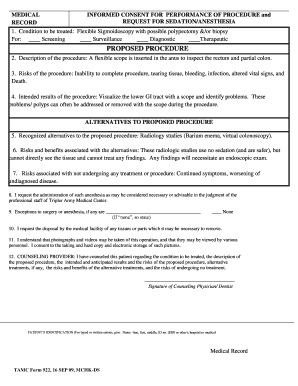
- Navigate to section one, where you will enter the condition to be treated. Indicate the purpose by checking the relevant box: Screening, Surveillance, Diagnostic, or Therapeutic.
- In section two, provide a brief description of the procedure you will undergo, which involves the insertion of a flexible scope for inspection.
- Review the risks mentioned in section three, such as tearing tissue, bleeding, or infection, and acknowledge your understanding.
- In section four, confirm the intended results of the procedure, focusing on visualizing the lower gastrointestinal tract to identify issues.
- Proceed to section five, where you will list any recognized alternatives to the proposed procedure, such as radiology studies.
- In section six, examine the associated risks and benefits of these alternative treatments.
- Reflect on the risks of not undergoing any treatment or procedure as stated in section seven.
- In section eight, provide your consent for the administration of anesthesia, as determined by professional staff.
- If applicable, detail any exceptions to surgery or anesthesia in section nine.
- Confirm your request for the disposal of any tissues or parts removed during the procedure in section ten.
- Acknowledge in section eleven that you consent to the taking and storage of photographs or videos during the procedure.
- Section twelve requires the signature of the counseling provider, indicating that all necessary information has been discussed.
- In section thirteen, provide your signature and date to confirm your understanding of the procedure and the associated risks.
- If you are a parent, legal guardian, or surrogate decision maker, complete section fourteen with the necessary signatures and relationship information.
- In the Universal Protocol Checklist, ensure all pre-procedure verifications are confirmed and then enter the necessary details.
- Finally, review all entered information for accuracy before saving, downloading, printing, or sharing the form as needed.
Complete your documents online today for a smoother medical experience.