Loading
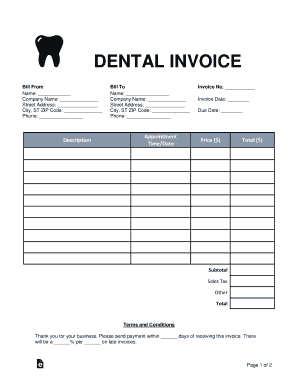
Get Dental Invoice 2018-2026
How it works
-

Open form follow the instructions
-

Easily sign the form with your finger
-

Send filled & signed form or save
How to fill out the Dental Invoice online
Filling out a dental invoice online is a straightforward process that ensures accurate billing and payment tracking. This guide provides step-by-step instructions to help users complete the Dental Invoice efficiently, ensuring all essential information is captured correctly.
Follow the steps to fill out the Dental Invoice online.
- Click ‘Get Form’ button to obtain the dental invoice and open it in your preferred document editor.
- In the 'Bill From' section, enter the name and company name of the service provider. Fill in the street address, city, state, zip code, and phone number accurately.
- In the 'Bill To' section, input the name and company name of the person or organization being billed. Ensure the street address, city, state, zip code, and phone number are filled out correctly.
- Indicate the appointment date and time in the designated section. This ensures clarity on when the services were rendered.
- Enter the invoice number, invoice date, and due date in the respective fields to maintain proper tracking.
- Provide the pricing details: Input the subtotal, sales tax, any additional charges, and calculate the total amount due.
- Read and acknowledge the terms and conditions. This includes payment timelines and late fees.
- Select your preferred payment type (credit card or bank wire). If paying by credit card, fill in the necessary details, including cardholder name, account number, expiration date, CVV, and zip code. Ensure you authorize the payment by signing where indicated.
- If choosing bank wire, enter the name on the bank account, street address, bank name, account number, routing number, and account type.
- Finally, save your changes and choose to download, print, or share the completed dental invoice as necessary.
Start filling out your dental invoice online now to ensure accurate billing and timely payments.
Related links form
Here are the details you need to add to this template to create a medical invoice: Medical service name. Address and logo (if applicable) Name of your client and address. Description of services. Number of hours. Unit rate. Net amount payable.