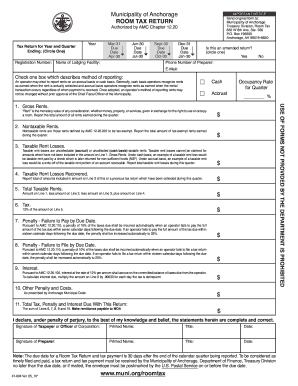
Get Ak Municipality Of Anchorage Room Tax Return (formerly 41-004) 2010
How it works
-

Open form follow the instructions
-

Easily sign the form with your finger
-

Send filled & signed form or save
How to fill out the AK Municipality of Anchorage Room Tax Return (formerly 41-004) online
Filling out the AK Municipality of Anchorage Room Tax Return can seem daunting, but this guide is designed to help you navigate the process smoothly and accurately. Whether you are a business owner or a tax preparer, you will find the steps outlined here to be clear and easy to follow.
Follow the steps to successfully complete your room tax return online.
- Click ‘Get Form’ button to obtain the form and open it in the editor.
- Select the appropriate year and quarter for which you are filing the tax return. You will need to circle the relevant ending date from the options provided.
- Indicate if this is an amended return by circling ‘Yes’ or ‘No.’ If it is an amended return, specify the date in the space provided.
- Fill in your registration number, the name of your lodging facility, and the phone number of the preparer. Also, provide the preparer’s email address.
- Choose your method of reporting by checking either the cash basis or accrual basis box. Remember that once you choose a method, you cannot change it without prior approval.
- Enter the total gross rents earned during the quarter in the designated field. This includes all forms of rents collected in exchange for room occupancy.
- Report any nontaxable rents in the specified area. Provide the total amount of tax-exempt rents earned during the quarter.
- Document taxable rent losses that you have experienced in the quarter. This would include amounts you cannot collect under both cash and accrual methods.
- If you have recovered any previously reported taxable rent losses during this quarter, record that amount in the corresponding field.
- Calculate the total taxable rents by subtracting nontaxable rents and taxable rent losses from gross rents and adding any recovered losses.
- Compute the tax amount due, which is 12% of the total taxable rents entered on the previous line.
- Fill in any penalties for failure to pay or file by the due date. These penalties may automatically increase if the deadline is missed.
- Calculate interest on any overdue taxes. Use the formula provided in the form to determine the interest amount.
- Record any other penalties or costs that may apply as prescribed by the Anchorage Municipal Code.
- Sum all calculated amounts to determine the total tax, penalties, and interest due with your return.
- Sign the form, confirming that the information is complete and correct. Ensure that both the taxpayer and preparer signatures are included where necessary.
- Review the completed form for accuracy, then save your changes, download, print, or share the form as needed.
Complete your tax return online today to ensure timely filing and payment!
Get form
Related links form
Anchorage property taxes are based on the assessed value of your property multiplied by the municipal tax rate. Various factors, such as improvements made or property class, can affect this valuation. To help clarify these calculations and ensure your property tax assessments are accurate, consider utilizing platforms that provide insights on the AK Municipality of Anchorage Room Tax Return (formerly 41-004).
Get This Form Now!
Industry-leading security and compliance
-
In businnes since 199725+ years providing professional legal documents.
-
Accredited businessGuarantees that a business meets BBB accreditation standards in the US and Canada.
-
Secured by BraintreeValidated Level 1 PCI DSS compliant payment gateway that accepts most major credit and debit card brands from across the globe.