Loading
Get Nz Hp 5383 2018-2026
How it works
-

Open form follow the instructions
-

Easily sign the form with your finger
-

Send filled & signed form or save
How to fill out the NZ HP 5383 online
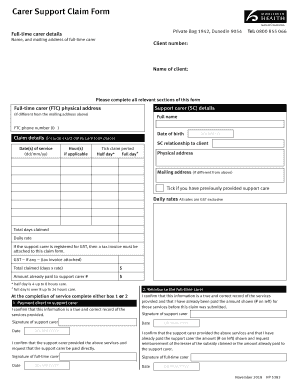
The NZ HP 5383 form is essential for claiming carer support. This guide will provide clear, step-by-step instructions to help you complete the form accurately and efficiently, ensuring you meet all necessary requirements.
Follow the steps to effectively complete the NZ HP 5383 form online.
- Press the ‘Get Form’ button to access the NZ HP 5383 form. This will open the document in your online editor for completion.
- Enter the full-time carer's details, including their name and mailing address. Ensure that all relevant information is accurately filled out.
- Provide the client number and the name of the client receiving care. This information is critical for processing the claim.
- Fill out the support carer details, including their physical address, phone number, and date of birth.
- List the dates when care was provided, ensuring to follow the dd/mm/yy format. If applicable, record the hours of care provided.
- Indicate the relationship of the support carer to the client. Select the appropriate claim period by ticking either ‘Half day’ or ‘Full day’ as applicable.
- Complete the physical and mailing addresses where required. If the support carer has previously provided care, check the appropriate box.
- Enter the total days claimed, daily rate, and any GST details if applicable. Ensure to provide accurate figures.
- At the completion of the service, mark either box 1 or 2 to indicate payment preferences. Both the support carer and full-time carer must sign and date accordingly.
- Review the entire form for completeness and accuracy. Once confirmed, save your changes, and utilize options to download, print, or share the completed form.
Complete your NZ HP 5383 application online today to ensure timely processing and support.
The quick answer is that any new printers will have no issue with Windows 10, as the drivers will, more often than not, be built into the devices – allowing you to use the printer without any issues. You can also check out if your device is compatible with Windows 10 by using the Windows 10 Compatibility Center.