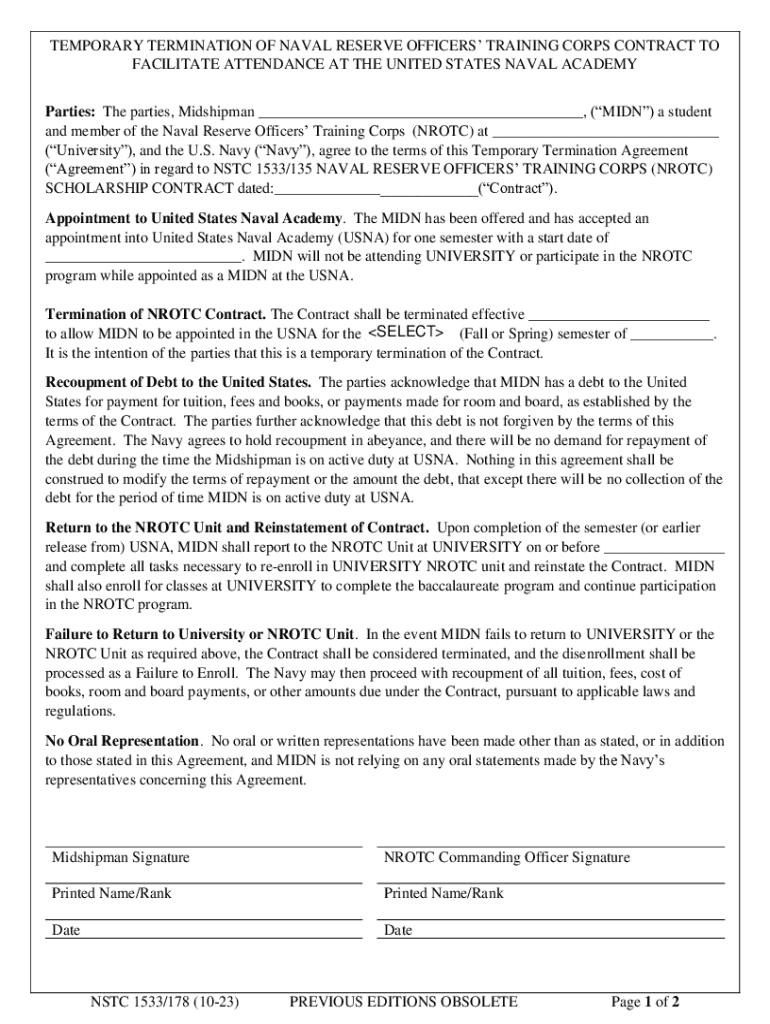
, ( MIDN ) a student and member of the Naval Reserve Officers Training Corps (NROTC) at ( University ), and the U.S. Navy ( Navy ), agree to the terms of this Temporary Termination Agreement ( Agreement ) in regard to NSTC 1533/135 NAVAL RESERVE OFFICERS TRAINING CORPS (NROTC) SCHOLARSHIP CONTRACT dated: ( Contract ). Appointment to United States Naval Academy. The MIDN has been offered and has accep.
Loading

Open form follow the instructions

Easily sign the form with your finger

Send filled & signed form or save
How to fill out and sign NSTC 1533/178 online?
Get your online template and fill it in using progressive features. Enjoy smart fillable fields and interactivity.Follow the simple instructions below:
Are you looking for a fast and convenient tool to fill in NSTC 1533/178 at a reasonable price? Our service provides you with a wide selection of templates available for completing on the internet. It only takes a couple of minutes.
Stick to these simple instructions to get NSTC 1533/178 prepared for sending:
- Choose the sample you need in our collection of legal templates.
- Open the form in the online editor.
- Go through the recommendations to determine which information you will need to provide.
- Click on the fillable fields and put the necessary details.
- Add the relevant date and place your e-autograph after you complete all of the fields.
- Double-check the completed document for misprints and other mistakes. If there?s a need to change something, the online editing tool and its wide variety of instruments are at your disposal.
- Download the completed document to your computer by clicking on Done.
- Send the electronic form to the intended recipient.
Completing NSTC 1533/178 doesn?t have to be confusing anymore. From now on simply cope with it from your home or at your office from your smartphone or personal computer.
Tips on how to fill out, edit and sign NSTC 1533/178 online
How to fill and sign NSTC 1533/178
Get your online template and fill it in using progressive features. Enjoy smart fillable fields and interactivity.Follow the simple instructions below:
Are you looking for a fast and convenient tool to fill in NSTC 1533/178 at a reasonable price? Our service provides you with a wide selection of templates available for completing on the internet. It only takes a couple of minutes.
Stick to these simple instructions to get NSTC 1533/178 prepared for sending:
- Choose the sample you need in our collection of legal templates.
- Open the form in the online editor.
- Go through the recommendations to determine which information you will need to provide.
- Click on the fillable fields and put the necessary details.
- Add the relevant date and place your e-autograph after you complete all of the fields.
- Double-check the completed document for misprints and other mistakes. If there?s a need to change something, the online editing tool and its wide variety of instruments are at your disposal.
- Download the completed document to your computer by clicking on Done.
- Send the electronic form to the intended recipient.
Completing NSTC 1533/178 doesn?t have to be confusing anymore. From now on simply cope with it from your home or at your office from your smartphone or personal computer.
How to edit NSTC 1533/178
Put the right document management capabilities at your fingertips. Execute NSTC 1533/178 with our reliable solution that comes with editing and eSignature functionality}.
If you want to execute and certify NSTC 1533/178 online without any inconvenience, then our online cloud-based option is the way to go. We offer a wealthy template-based library of ready-to-use paperwork you can change and complete online. In addition, you don't need to print out the document or use third-party solutions to make it fillable. All the needed features will be readily available at your disposal once you open the document in the editor.
Let’s examine our online editing capabilities and their main features. The editor features a intuitive interface, so it won't take a lot of time to learn how to utilize it. We’ll check out three main sections that allow you to:
- Edit and annotate the template
- Organize your documents
- Prepare them for sharing
The top toolbar comes with the features that help you highlight and blackout text, without graphics and image factors (lines, arrows and checkmarks etc.), sign, initialize, date the form, and more.
Use the toolbar on the left if you wish to re-order the form or/and remove pages.
If you want to make the template fillable for others and share it, you can use the tools on the right and add different fillable fields, signature and date, text box, etc.).
Apart from the capabilities mentioned above, you can protect your document with a password, add a watermark, convert the document to the required format, and much more.
Our editor makes modifying and certifying the NSTC 1533/178 a piece of cake. It enables you to make just about everything when it comes to dealing with forms. Moreover, we always make sure that your experience editing documents is secure and compliant with the major regulatory criteria. All these aspects make using our solution even more enjoyable.
Get NSTC 1533/178, make the needed edits and changes, and get it in the desired file format. Try it out today!
How to fill and sign NSTC 1533/178
Get your online template and fill it in using progressive features. Enjoy smart fillable fields and interactivity.Follow the simple instructions below:
Are you looking for a fast and convenient tool to fill in NSTC 1533/178 at a reasonable price? Our service provides you with a wide selection of templates available for completing on the internet. It only takes a couple of minutes.
Stick to these simple instructions to get NSTC 1533/178 prepared for sending:
- Choose the sample you need in our collection of legal templates.
- Open the form in the online editor.
- Go through the recommendations to determine which information you will need to provide.
- Click on the fillable fields and put the necessary details.
- Add the relevant date and place your e-autograph after you complete all of the fields.
- Double-check the completed document for misprints and other mistakes. If there?s a need to change something, the online editing tool and its wide variety of instruments are at your disposal.
- Download the completed document to your computer by clicking on Done.
- Send the electronic form to the intended recipient.
Completing NSTC 1533/178 doesn?t have to be confusing anymore. From now on simply cope with it from your home or at your office from your smartphone or personal computer.
Experience a faster way to fill out and sign forms on the web. Access the most extensive library of templates available.
Get answers to your most pressing questions about US Legal Forms API.
Where is the NSTC naval service training command located?
The Naval Service Training Command (NSTC) is located at Naval Station Great Lakes in Illinois. This facility plays a vital role in training and preparing future Navy leaders. If you are looking for specific directions or further information, visiting the NSTC 1533/178 page on their website will provide detailed resources about the location. Engaging with their customer service can also help clarify any other location-related questions you might have.
How can I contact NSTC?
You can contact the Naval Service Training Command (NSTC) by visiting their official website, where you will find various contact options. They offer email addresses and phone numbers for specific inquiries related to NSTC 1533/178. It's advisable to specify your question or concern clearly to receive a prompt and accurate response. Utilizing the contact form on their site also ensures your queries are directed to the right department.
Use professional pre-built templates to fill in and sign documents online faster. Get access to thousands of forms.
If you believe that this page should be taken down, please follow our DMCA take down process here.