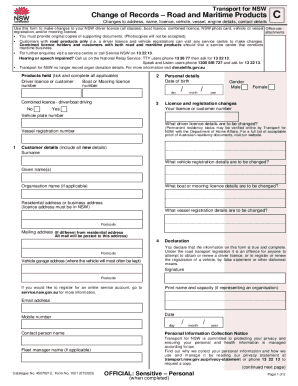
Transport for NSWCChange of Records Road and Maritime Products Changes to address, name, licence, vehicle, vessel, engine details, contact detailsUse this form to make changes to your NSW driver.
Open form follow the instructions
Easily sign the form with your finger
Send filled & signed form or save
How to fill out the AU NSW Form 1021 online
Filling out the AU NSW Form 1021 online is a straightforward process that allows users to make necessary changes to their driver licences, vehicle registrations, and more. This guide will assist you in navigating each section of the form with clear instructions tailored to your needs.
Follow the steps to complete the form online effectively.
- Click ‘Get Form’ button to obtain the form and open it for completion.
- Identify which products you hold by ticking the appropriate boxes for your driver licence, boat licence, or mooring licence on the form.
- Provide your personal details, including your date of birth, gender, and the name as it appears on your current identification.
- In the licence and registration changes section, enter your current licence or customer number along with the details that need to be updated, such as your vehicle plate number or vessel registration number.
- Include your new residential address and mailing address if different. Ensure that the address provided is within New South Wales.
- Complete the declaration section by confirming that all the information provided is accurate and true. Sign and date the form.
- If applicable, fill out the representative's authority section if you are designating someone else to conduct business on your behalf.
- Lastly, review all entries to ensure that all required fields are filled out accurately, then save any changes, download, print, or share the completed form as needed.
Complete your AU NSW Form 1021 online today for efficient management of your records.
Experience a faster way to fill out and sign forms on the web. Access the most extensive library of templates available.
Related content
This Registration Statement contains two forms of prospectuses: one to be used in...
Are you ready to apply to Monash University? We want to make the application process...
YPJT 052130Z AUTO 05007KT 9999 // NCD 14/08 Q1021 RF00.0/000.0. Conditions at: YPJT...
Get answers to your most pressing questions about US Legal Forms API.
Where to find RMS customer number NSW?
How do I find my Service NSW customer number? You can get a Transport for NSW (RMS) customer number by visiting any Service NSW centre. You can find out more information from the Service NSW website.
How do I get a NSW customer number?
To get a Transport for NSW Customer number you must prove your identity. Details of acceptable proof of identity documents are available at roads-waterways.transport.nsw.gov.au, visit any service centre or call us on 13 22 13. You must attend in person to complete this transaction.
How do I change the color of my car in NSW?
If you need to make a change to your vehicle's details, including colour and fittings, please visit a service centre. The changes may need to be verified by an authorised examiner, or other Transport for NSW official, before the changes are recorded.
What is a NSW Transport number?
For public transport: 131 500. For driving and boating: 13 22 13.
What is a customer reference number NSW?
A CRN is a Customer Reference Number provided as identification by the Department of Transport and Main Roads. Your CRN is normally your driver's licence; learner license number or 18 + card number. Company CRNs can be found on your registration certificate.
How do I change my address on my NSW photo card?
To update your address, you must do 1 of the following: change your address online. call the Department of Transport and Main Roads on 13 23 80—you will be asked a series of questions to establish your identity. visit a transport and motoring customer service centre—bring your licence with you.
Use professional pre-built templates to fill in and sign documents online faster. Get access to thousands of forms.
If you believe that this page should be taken down, please follow our DMCA take down process here.