Loading
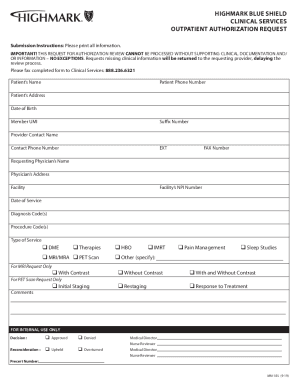
Get Highmark Blue Shield Mm-185 2019-2026
How it works
-

Open form follow the instructions
-

Easily sign the form with your finger
-

Send filled & signed form or save
How to fill out the Highmark Blue Shield MM-185 online
The Highmark Blue Shield MM-185 form is crucial for submitting outpatient authorization requests. This guide provides step-by-step instructions to help users navigate and complete the form accurately and efficiently.
Follow the steps to accurately complete the Highmark Blue Shield MM-185 form.
- Click the ‘Get Form’ button to access the form and open it in your preferred editor.
- Begin by entering the patient’s name at the top of the form. Ensure that you provide the correct spelling as it appears on official documents.
- Next, fill in the patient’s phone number, address, date of birth, and member UMI. These details are essential for processing the authorization request.
- Proceed to include the suffix number and the name of the provider’s contact person, along with their phone number and fax number.
- List the requesting physician’s name and address, along with the facility name and its NPI number, ensuring all information is accurate.
- Indicate the date of service, along with the appropriate diagnosis and procedure codes required for authorization.
- Select the type of service being requested by checking the relevant boxes, such as DME, therapies, MRI/MRA, PET scans, etc.
- For specific requests like MRI and PET scans, make sure to provide additional details by checking the relevant options under each category.
- Include any comments that may help clarify the authorization request.
- Once all fields are filled out, review the information for accuracy before saving your changes.
- Finally, you may save, download, print, or share the completed MM-185 form as needed.
Complete your Highmark Blue Shield MM-185 form online efficiently and accurately.
Medicare Advantage plans come in a variety of types — like HMO, PPO, and HMO-POS.