Loading
Get Rock Valley College Accounts Payable Check Request 2017-2026
How it works
-

Open form follow the instructions
-

Easily sign the form with your finger
-

Send filled & signed form or save
How to fill out the Rock Valley College Accounts Payable Check Request online
Filling out the Rock Valley College Accounts Payable Check Request is essential for processing payments efficiently. This guide will walk you through each section of the form to ensure accurate and timely submissions.
Follow the steps to complete your check request form.
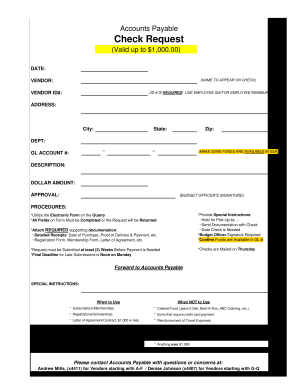
- Press the ‘Get Form’ button to obtain the form and access it in your preferred online format.
- Fill in the 'Date' section at the top of the form with the correct submission date.
- In the 'Name to appear on check' field, enter the name as it should appear on the payment check.
- For the 'Vendor' field, provide the name of the vendor receiving the payment, ensuring the vendor ID number is inserted next to it.
- Input the 'Vendor ID#' as required, using the employee ID number for reimbursement requests pertaining to employees.
- Complete the 'Address' fields, including city, state, and zip code, to ensure the check is mailed correctly.
- Select the appropriate 'Department' responsible for the payment processing.
- Enter the correct 'GL Account #' to ensure the correct budget line is charged; confirm that funds are available.
- Provide a clear and specific 'Description' of the item or service for which the payment is requested.
- Fill in the 'Dollar Amount' of the request, ensuring it does not exceed $1,000.00 and has a budget officer's signature included.
- In the 'Approval' section, ensure you have the necessary signatures from both the budget officer and any other required authorities.
- Include any 'Special Instructions' that may be relevant for processing the request, such as hold for pick-up or documentation details.
- Ensure all fields on the form are completed, as incomplete forms will be returned for further information.
- Attach any required supporting documentation such as detailed receipts, registration forms, and letters of agreement.
- Once all information is complete, save your changes, and consider downloading, printing, or sharing the form for further processes.
Start filling out your Rock Valley College Accounts Payable Check Request online today!
Free tuition is limited to the course and program enrollment capacity. Course, program, or institutional fees, textbooks, and related instructional materials are not provided as part of the free tuition. Free Tuition is limited to residents of RVC's service area, District 511.