Loading
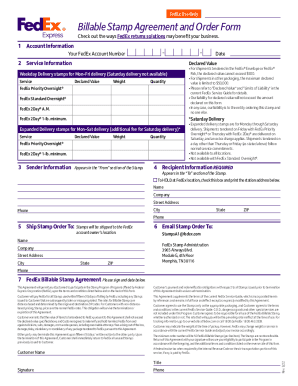
Get Fedex Billable Stamp Order Form 11
How it works
-

Open form follow the instructions
-

Easily sign the form with your finger
-

Send filled & signed form or save
How to fill out the FedEx Billable Stamp Order Form 11 online
This guide provides step-by-step instructions on how to complete the FedEx Billable Stamp Order Form 11 online. By following these instructions, users can easily navigate each section of the form and ensure all necessary information is accurately provided.
Follow the steps to complete the FedEx Billable Stamp Order Form 11 accurately.
- Press the ‘Get Form’ button to access the FedEx Billable Stamp Order Form 11 and open it in your editor.
- Fill out the account information section by entering your FedEx account number. This is essential for identifying your account against the order.
- In the service information section, select the desired service type, such as FedEx Priority Overnight or FedEx Standard Overnight. Enter the declared value, weight, and quantity for each selected service.
- Complete the sender information section. Include your name, company, street address, city, and phone number. Be mindful of the declared value limitations based on shipping method.
- Provide recipient information, which is required. Enter the recipient's name, company, street address, city, and phone number. If you want to hold the package at a FedEx location, check the corresponding box and include the station address.
- Indicate where the stamps should be shipped by filling out the 'Ship Stamp Order To' section. Include your name, company, street address, city, state, ZIP code, and phone number.
- Email the completed Stamp Order Form to StampsA1@fedex.com, or you may choose to send it to the physical address provided for FedEx Stamp Administration.
- Review the FedEx Billable Stamp Agreement, then sign and date the form to confirm your understanding and commitment to the terms outlined.
- Once all information is accurately filled out, you can save changes, download the completed form, or print it for your records or further sharing.
Complete your FedEx Billable Stamp Order Form 11 online today to ensure prompt processing and shipment.
Write the date, your name, address, and telephone number in the “From” section on the right-hand side of the FedEx® Billable Stamp (shipping label). DO NOT make any other changes to the stamp or sign the “Release Signature” area. Peel off the adhesive backing on the FedEx Billable Stamp.