Loading
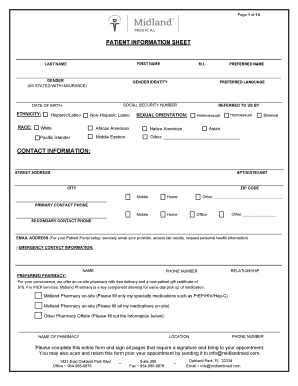
Get Fl Midland Medical Broward New Patient Forms Packet 2019-2025
How it works
-

Open form follow the instructions
-

Easily sign the form with your finger
-

Send filled & signed form or save
How to fill out the FL Midland Medical Broward New Patient Forms Packet online
Filling out the FL Midland Medical Broward New Patient Forms Packet online is a straightforward process designed to gather essential patient information. This guide will walk you through each section of the form, ensuring you complete it accurately and efficiently.
Follow the steps to fill out your new patient forms online.
- Click the ‘Get Form’ button to access the FL Midland Medical Broward New Patient Forms Packet and open it for editing.
- Provide your personal information in the 'Patient Information Sheet' section. Fill in your first name, last name, preferred name, and gender as stated with your insurance. Additionally, include your race, date of birth, ethnicity, and social security number where required.
- Enter your contact information, including your street address, apartment or suite number, city, and zip code. Include both a primary and secondary contact phone number, as well as your email address for patient portal setup.
- Complete the emergency contact information by providing the name, phone number, and relationship of your emergency contact.
- For the preferred pharmacy section, indicate whether you would like to utilize the on-site pharmacy or an off-site pharmacy. Fill in the necessary details if you choose an off-site option.
- Proceed to the 'Midland Medical New Patient Questionnaire.' Here, answer questions about your personal health history, including any diagnosed medical problems, medications you take, allergies, and vaccination history.
- Fill out the 'Health Habits and Personal Safety' section, indicating your alcohol consumption, tobacco use, sexual health, and exercise habits. All questions in this section are optional.
- Provide your family health history by listing ages and significant health problems of family members.
- In the 'Review of Symptoms' section, check any symptoms you may be experiencing, and provide explanations as necessary.
- Sign the assignment of insurance and release agreement to authorize filing claims on your behalf. Ensure you understand your financial responsibilities regarding medical services.
- Read and sign the HIPAA waiver, providing preferences for how confidential information can be released and to whom.
- Complete the authorization for release of medical records, specifying which records you wish to obtain and from whom.
- Sign the patient financial responsibility form to acknowledge your understanding of the payment policy.
- Finally, save your changes once all sections are filled out. You can download, print, or share the completed forms directly from your device.
Begin filling out your forms online today to ensure a smooth and efficient appointment process.
ing to Florida law, a physician is responsible for maintaining records for at least five years (64B8-10.002). Because malpractice lawsuits can be brought up to seven years after the date of an incident (eight years for some minors), physicians are encouraged to maintain records for the full seven years.
Industry-leading security and compliance
US Legal Forms protects your data by complying with industry-specific security standards.
-
In businnes since 199725+ years providing professional legal documents.
-
Accredited businessGuarantees that a business meets BBB accreditation standards in the US and Canada.
-
Secured by BraintreeValidated Level 1 PCI DSS compliant payment gateway that accepts most major credit and debit card brands from across the globe.