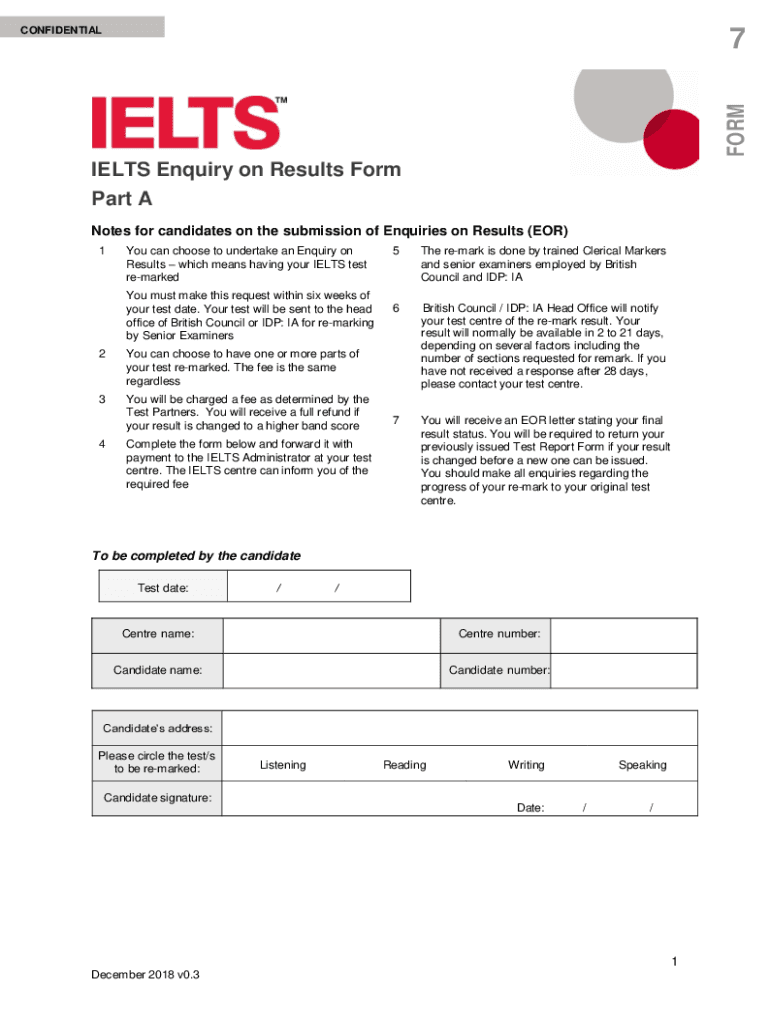
CONFIDENTIALFORM7IELTS Enquiry on Results Form Part A Notes for candidates on the submission of Enquiries on Results (EOR) 1You can choose to undertake an Enquiry on Results which means having your.
Loading

Open form follow the instructions

Easily sign the form with your finger

Send filled & signed form or save
How to fill out the BR IELTS Enquiry On Results Form online
This guide provides clear and concise instructions on how to complete the BR IELTS Enquiry On Results Form online. Follow these steps to ensure a smooth and successful request for re-marking your IELTS test results.
Follow the steps to complete the form correctly.
- Click ‘Get Form’ button to obtain the form and open it in the editor.
- Begin by entering your test date in the designated field. Format the date as dd/mm/yyyy for clarity.
- Input the name of your test center in the 'Centre name' field, ensuring it matches the official records.
- Add your candidate name as it appears on your identification documents in the relevant field.
- Fill in your candidate number, which can be found on your Test Report Form.
- Provide your current address in the candidate's address section, making sure to include all relevant details.
- Circle the tests you wish to have re-marked: Listening, Reading, Writing, and Speaking.
- Sign and date the form at the bottom to certify that the information is accurate and complete.
- Once all sections are completed, you can save changes, download, print, or share the completed form as needed.
Complete your BR IELTS Enquiry On Results Form online today!
Experience a faster way to fill out and sign forms on the web. Access the most extensive library of templates available.
Related content
Nov 17, 2020 — Papers Ielts Sample Paper British Council - PvdA IELTS Enquiry on...
For example, I cite the IELTS training website of former British Council ... change after...
From British council or IDP official without taking the test? Want to Improve your Band...
Get answers to your most pressing questions about US Legal Forms API.
How can I get IELTS Enquiry on results?
How to request the Enquiry on Results for IELTS? You can request an Enquiry of Results for your IELTS Academic and IELTS General Training tests directly through your Test Taker Portal. Once you are logged on the platform, go to the "Completed Exams" area and click on the date of the exam you want a grade review for.
Can I download my IELTS result online from British Council?
Test results will be available online from 3 to 5 days from test date for CD IELTS and after 13 days for PB IELTS, unless a delay for administrative reasons occurs, as reported in our Terms and Conditions which you have accepted when enrolling to the exam.
How can I download IELTS report form British Council?
Login to .ielts.org/TRF with your email address (same as the one given in the application form) and your password (the one you got in your registration e-mail). Click the option Download Results on the left-hand side menu. Choose the range of dates for the results that you wish to download.
How can I get old IELTS results from British Council?
You can log in to the Test Taker Portal to preview your results. IELTS results remain online for 28 days but should not be used as an official confirmation of your performance. If you lose your Test Report Form or forget your test results, please contact your British Council test centre.
Can I get a copy of my IELTS results?
Can I get additional copies of my IELTS results? If you want us to send another copy of your TRF to a recognising organisation , please contact your local test centre. If your test centre has been closed, you can order additional test report forms from ielts.org .
How can I download my British Council IELTS result online?
Login to your TestTaker Portal with your login details. IELTS on Computer: Results will be available online within 3-5 days after the test date. Check your results on the Test Taker Portal. UK Visas and Immigration (UKVI): Results will be available on the 13th day after the test date.
How can I get a copy of my British Council IELTS result?
You can check the results on the Test Taker Portal. If you have taken the computer based test, you will be able to preview your results after 3-5 calendar days from the test date. Check the results on the Test Taker Portal. You can log in to the Test Taker Portal to preview your results.
Use professional pre-built templates to fill in and sign documents online faster. Get access to thousands of forms.
If you believe that this page should be taken down, please follow our DMCA take down process here.