Loading
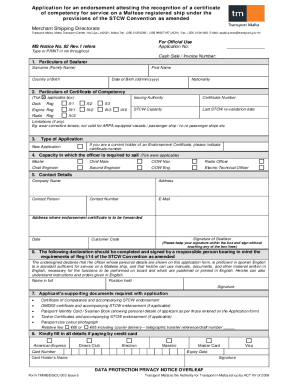
Get Mt Tm/msd/scu 003 2023-2026
How it works
-

Open form follow the instructions
-

Easily sign the form with your finger
-

Send filled & signed form or save
How to fill out the MT TM/MSD/SCU 003 online
This guide provides a comprehensive overview of how to complete the MT TM/MSD/SCU 003 form online. It includes step-by-step instructions to help users navigate through the application process with ease.
Follow the steps to successfully complete your application.
- Press the ‘Get Form’ button to retrieve the form and open it in your chosen online editor.
- In the first section, labeled 'Particulars of Seafarer', enter your surname, first name, country of birth, date of birth (in dd/mm/yyyy format), and nationality.
- Proceed to the 'Particulars of Certificate of Competency' section. Here, tick the appropriate box for the type of certificate you are applying for (Deck, Engine, or Radio) and provide the relevant details including the issuing authority, certificate number, STCW capacity, last STCW re-validation date, and any limitations.
- Next, fill out the 'Type of Application' section by selecting 'New Application' or indicate if you hold a current endorsement certificate by providing the certificate number.
- In the ‘Capacity in which the officer is required to sail’ section, select the applicable roles by ticking the boxes that correspond to your intended capacity.
- Complete your contact details in the provided fields, ensuring to include your address, company name, contact person, contact number, and e-mail address where the endorsement certificate should be sent.
- Provide the date and your signature in the designated box, ensuring that your signature does not touch the box lines.
- Have a responsible person complete the declaration section verifying the officer's proficiency in spoken English, including their name, position held, and signature.
- Attach all required supporting documents, such as the Certificate of Competence, GMDSS certificate (if applicable), passport/identity card, tanker certificates (if applicable), and a passport-sized color photograph.
- Fill out the payment section if you are paying by credit card, including card type, card number, expiry date, cardholder's name, and signature.
- Once all sections are complete, review your application for accuracy. Save changes, download a copy, and share it as needed.
Complete your application online today to ensure timely processing of your endorsement.
Related links form
NY Dover Union Free School District Document Based Question Erie Canal 2010
OH Request For Reasonable Accommodation Or Modification Form 2015
PA Clean And Green Valuation Application - County Of Dauphin 2023
FL Application For Zoning Action Comprehensive Plan Amendment Or Variance - Brevard County 2021