Loading
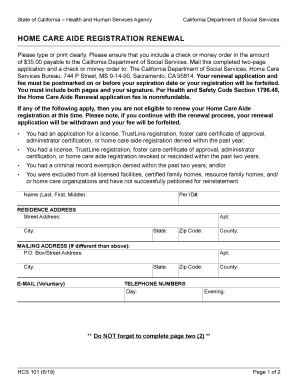
Get Ca Hcs 101 2019-2026
How it works
-

Open form follow the instructions
-

Easily sign the form with your finger
-

Send filled & signed form or save
How to fill out the CA HCS 101 online
Filling out the CA HCS 101 form online is a straightforward process that enables home care aides to renew their registration efficiently. This guide provides step-by-step instructions to ensure that you complete the form accurately and submit it without issues.
Follow the steps to complete your CA HCS 101 form online.
- Click ‘Get Form’ button to obtain the form and open it in the online editor.
- Begin by filling in your name in the format of Last, First, Middle as required in the designated field.
- Enter your identification number in the 'Per ID#' field for tracking purposes. This number is essential for your registration.
- Complete the residence address section by filling in your street address, apartment number (if applicable), city, state, zip code, and county.
- If your mailing address differs from your residence address, fill in the mailing address section, providing the necessary details.
- Optionally, provide your email address in the designated field for communication purposes.
- Fill in both day and evening telephone numbers in the respective fields to ensure you can be reached if necessary.
- On page two, review the disclosure of personal information section. If you wish to opt-out of having your personal information shared with labor organizations, make sure to check the appropriate box.
- Finalize the form by signing and dating it, declaring that all provided information is correct to the best of your knowledge.
- After completing both pages of the form, ensure to save your changes. You can then download, print, or share the completed form as necessary.
Complete your CA HCS 101 form online today to ensure your registration renewal is processed in a timely manner.
IF YOU NEED TO FIND OUT YOUR EXISTING HCA NUMBER PLEASE CALL DSS (THE STATE OF CALIFORNIA) AT (877) 424-5778.