Loading
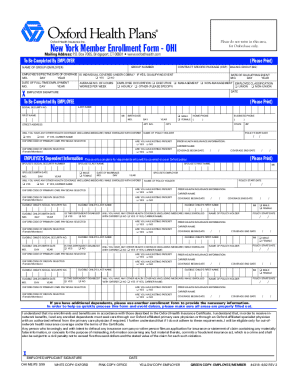
Get Ct Oxford Health Plans 4318 2002-2026
How it works
-

Open form follow the instructions
-

Easily sign the form with your finger
-

Send filled & signed form or save
How to fill out the CT Oxford Health Plans 4318 online
This guide provides clear, step-by-step instructions to help you fill out the CT Oxford Health Plans 4318 form accurately and efficiently. Ensuring that all required information is entered correctly is essential for a smooth enrollment process.
Follow the steps to complete the CT Oxford Health Plans 4318 form online.
- Press the ‘Get Form’ button to retrieve the CT Oxford Health Plans 4318 form and open it in your editor of choice.
- Begin with the employer section. Fill in the group number, specific package information, billing group, and the date of full-time employment. Ensure that the employer's signature is included and that the effective date of coverage is specified.
- Move to the employee section. Start by entering your last name, first name, middle initial, birth date, and social security number. Also, provide your mailing address, including the zip code.
- Indicate whether you will have other health coverage while enrolled with Oxford by selecting yes or no. Provide details of the policy holder's name and the start date of the policy if applicable.
- If you have dependents who will be covered, input their information, including last name, first name, social security number, and birth date. Indicate if any dependent is disabled and if they have existing health coverage.
- Review all the entered information for accuracy, ensuring that all sections are completed as per the requirements to avoid any delays.
- After verifying your information, sign and date the form at the bottom to confirm your enrollment. Make sure to press firmly when signing.
- Finally, save your changes, and choose to download, print, or share the completed form as needed.
Complete your CT Oxford Health Plans 4318 form online today to ensure timely processing of your enrollment.
Related links form
Oxford Benefit Management℠ acts as the distribution company for products by UnitedHealthcare, and OptumHealth including: dental, vision and an optional life benefit. Using these products, we have created several different plans to offer employers a wide range of choices to suit varying needs.