Loading
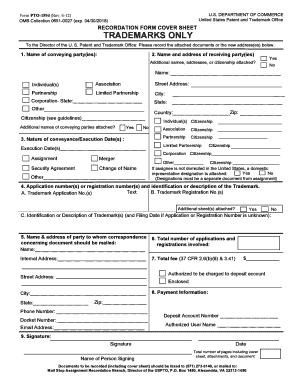
Get Doc Form Pto-1594 2012-2026
How it works
-

Open form follow the instructions
-

Easily sign the form with your finger
-

Send filled & signed form or save
How to fill out the DOC Form PTO-1594 online
Understanding how to accurately fill out the DOC Form PTO-1594 is essential for successfully completing trademark assignments. This guide provides clear, step-by-step instructions for each section of the form to help users navigate the online process with ease.
Follow the steps to complete your DOC Form PTO-1594 online.
- Click ‘Get Form’ button to obtain the form and open it in the editor.
- Enter the name of the conveying party or parties in the designated field. If additional conveying parties are included, indicate this by checking 'Yes' and attaching a separate page.
- Fill out the name and address of the receiving party or parties. Indicate the type of legal entity and check the appropriate box, ensuring to input detailed citizenship information.
- Provide the nature of conveyance and execution date. Select the applicable conveyance type and enter the date in a clear format.
- Indicate the application and registration numbers of the trademark(s). If additional information is required, check 'Yes' and attach further documentation.
- Complete the section for correspondence by entering the name and address of the party to be contacted regarding this document.
- Specify the total number of applications and registrations involved by entering the corresponding number.
- Input the total fee for recording. Ensure that the fee you enter aligns with the number of applications and registrations processed.
- Fill in the payment information section with the deposit account number and authorized user name to facilitate the transaction.
- Finally, provide the signature and name of the individual submitting the form, along with the date and total number of pages being submitted.
- After completing the form, you can choose to save changes, download, print, or share the document as needed.
Begin your digital document process by completing the DOC Form PTO-1594 online today.