Loading
Form preview
  • US Legal Forms
  • Other Templates
  • More Forms
  • More Multi-State Forms
  • Fl Orange County Public Schools Direct Deposit Authorization 2019

Get Fl Orange County Public Schools Direct Deposit Authorization 2019-2026

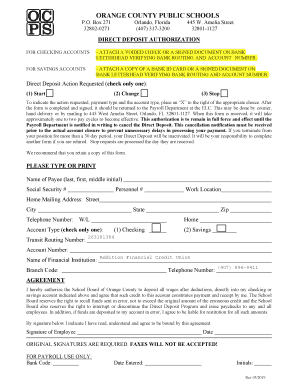
ORANGE COUNTY PUBLIC SCHOOLS P.O. Box 271 328020271Orlando, Florida (407) 3173200445 W. Amelia Street 328011127DIRECT DEPOSIT AUTHORIZATION FOR CHECKING ACCOUNTS ATTACH A VOIDED CHECK OR A SIGNED.

How it works

  1. Open form

    Open form follow the instructions

  2. Easily sign form

    Easily sign the form with your finger

  3. Share form

    Send filled & signed form or save

How to fill out the FL Orange County Public Schools Direct Deposit Authorization online

The FL Orange County Public Schools Direct Deposit Authorization form is essential for setting up or modifying your direct deposit preferences. This guide provides clear, step-by-step instructions on how to complete the form online, ensuring a seamless experience.

Follow the steps to complete your direct deposit authorization form.

  1. Press the ‘Get Form’ button to access the document and open it in the editor.
  2. Begin filling in your personal information. Enter your name (last, first, middle initial), social security number, personnel number, and work location. Ensure that all details are accurate.
  3. Provide your home mailing address. Fill in the street address, city, state, zip code, and telephone number. Make sure this information can be verified.
  4. Indicate the type of account you wish to use for direct deposit by placing an ‘X’ next to either 'Checking' or 'Savings'.
  5. Input your transit routing number and account number for the financial institution. Confirm these numbers for accuracy to avoid issues with deposits.
  6. Record the name of your financial institution and include the branch code if applicable.
  7. Read the agreement section carefully. By signing, you are authorizing the School Board of Orange County to deposit your wages into the specified account. Ensure you understand your obligations regarding potential errors.
  8. Sign and date the form. Remember that original signatures are required; faxed documents will not be accepted.
  9. Finally, save the completed form to your device. You may then choose to download, print, or share the document as necessary. Ensure you keep a copy for your records.

Complete your FL Orange County Public Schools Direct Deposit Authorization form online today!

Get form

Experience a faster way to fill out and sign forms on the web. Access the most extensive library of templates available.
Get form

Related content

Foundation for Orange County Public Schools, Inc.
FOUNDATION FOR ORANGE COUNTY PUBLIC SCHOOLS, INC. A COMPONENT UNIT OF THE ORANGE COUNTY...
Learn more
table of contents
EXCLUDED: All other positions of the Orange County Public Schools are excluded. ... All...
Learn more
Florida Tariff Local
This Price List sets forth the descriptions, regulations and rates applicable to the...
Learn more

Related links form

OH History Connection Historical Marker Application 2023 OK HVAC Solutions Preventative Maintenance Agreement 2013 OR Appraiser Certification And Licensure Board Temporary Non-Resident Application 2015 UT Syracuse High School Choirs Audition Form 2023

Questions & Answers

Get answers to your most pressing questions about US Legal Forms API.

Contact support

0:00 0:54 Details of a Direct Deposit Authorization - YouTube YouTube Start of suggested clip End of suggested clip A direct deposit authorization. Form allows a third party such as an employer to send money to aMoreA direct deposit authorization. Form allows a third party such as an employer to send money to a bank account by using the account holders routing and account numbers. Sometimes an employer or

Here's everything you need to know about how to set up direct deposit at your financial institution. Get a direct deposit form from your employer. Ask for a written or online direct deposit form. ... Fill in account information. ... Confirm the deposit amount. ... Attach a voided check or deposit slip, if required. ... Submit the form.

Your employer (or other payer) will ask you to complete a direct deposit form that will ask for several personal details, including your name, address, Social Security number and signature for authorization of the direct deposit. Include your account information.

“I hereby authorize…” Statement. Include a paragraph sharing all the information and permissions that the employee is signing for. Foremost, it should state that by signing, the employee is authorizing the employer to directly deposit their pay into their listed bank account(s).

The TD Bank direct deposit form may be used to set up your Employer Payroll Compensation or Government Benefit Compensation to be deposited in a TD Bank Account you hold. Merely fill out the form then submit it to your Employer or Government Paying Entity.

How To Request/Obtain A Bank Letter In-person: The quickest way to obtain a bank letter is to request one in-person. ... By phone: Another convenient way to obtain a bank letter is to call your bank's support line. ... By email: Depending on your bank, you may be able to request a bank letter via email.

A direct deposit authorization form is a form that employees fill out to authorize their employer to deposit money straight into their bank account. Direct deposit is the standard method most businesses use for paying employees.

Get This Form Now!

Use professional pre-built templates to fill in and sign documents online faster. Get access to thousands of forms.
Get form
If you believe that this page should be taken down, please follow our DMCA take down processhere.
Get FL Orange County Public Schools Direct Deposit Authorization
Get form
  • Adoption
  • Bankruptcy
  • Contractors
  • Divorce
  • Home Sales
  • Employment
  • Identity Theft
  • Incorporation
  • Landlord Tenant
  • Living Trust
  • Name Change
  • Personal Planning
  • Small Business
  • Wills & Estates
  • Packages A-Z
  • Affidavits
  • Bankruptcy
  • Bill of Sale
  • Corporate - LLC
  • Divorce
  • Employment
  • Identity Theft
  • Internet Technology
  • Landlord Tenant
  • Living Wills
  • Name Change
  • Power of Attorney
  • Real Estate
  • Small Estates
  • Wills
  • All Forms
  • Forms A-Z
  • Other Templates
  • Legal Hub
  • About Us
  • Help Portal
  • Legal Resources
  • Blog
  • Affiliates
  • Contact Us
  • Delete My Account
  • Site Map
  • Industries
  • Forms in Spanish
  • Localized Forms
  • State-specific Forms
  • Forms Kit
  • Real Estate Handbook
  • All Guides
  • Notarize
  • Incorporation services
  • For Consumers
  • For Small Business
  • For Attorneys
  • USLegal
  • FormsPass
  • pdfFiller
  • signNow
  • altaFlow
  • DocHub
  • Instapage
Form Packages
  • Adoption
  • Bankruptcy
  • Contractors
  • Divorce
  • Home Sales
  • Employment
  • Identity Theft
  • Incorporation
  • Landlord Tenant
  • Living Trust
  • Name Change
  • Personal Planning
  • Small Business
  • Wills & Estates
  • Packages A-Z
Form Categories
  • Affidavits
  • Bankruptcy
  • Bill of Sale
  • Corporate - LLC
  • Divorce
  • Employment
  • Identity Theft
  • Internet Technology
  • Landlord Tenant
  • Living Wills
  • Name Change
  • Power of Attorney
  • Real Estate
  • Small Estates
  • Wills
  • All Forms
  • Forms A-Z
  • Other Templates
Customer Service
  • Legal Hub
  • About Us
  • Help Portal
  • Legal Resources
  • Blog
  • Affiliates
  • Contact Us
  • Delete My Account
  • Site Map
  • Industries
  • Forms in Spanish
  • Localized Forms
  • State-specific Forms
  • Forms Kit
Legal Guides
  • Real Estate Handbook
  • All Guides
Prepared for you
  • Notarize
  • Incorporation services
Our Customers
  • For Consumers
  • For Small Business
  • For Attorneys
Our Sites
  • USLegal
  • FormsPass
  • pdfFiller
  • signNow
  • altaFlow
  • DocHub
  • Instapage
Social Media
Call us now toll free:
+1 833 426 79 33
As seen in:
© Copyright 1999-2026 airSlate Legal Forms, Inc. 17 Station Street, Suite 303, Brookline, MA 02445
  • Your Privacy Choices
  • Terms of Service
  • Privacy Notice
  • Content Takedown Policy
  • Bug Bounty Program