Loading
Get Za Ec-38 2016-2026
How it works
-

Open form follow the instructions
-

Easily sign the form with your finger
-

Send filled & signed form or save
How to fill out the ZA EC-38 online
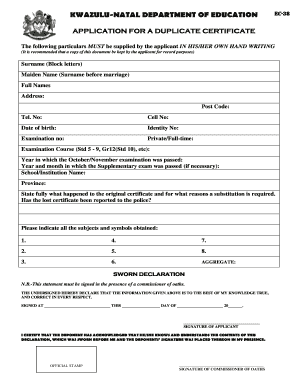
The ZA EC-38 is the application form for obtaining a duplicate certificate from the KwaZulu-Natal Department of Education. This guide provides clear and supportive instructions on how to complete the form effectively and efficiently in an online setting.
Follow the steps to successfully complete the ZA EC-38 form.
- Click the ‘Get Form’ button to access the application form. This will allow you to open the form in your preferred online editor.
- In the designated field, write your surname in block letters. Make sure it is legible.
- Provide your maiden name, if applicable, in the corresponding field for surname before marriage.
- Enter your full names as they appear on your identification documents.
- Fill in your address, including the postal code to ensure correct correspondence.
- Include your telephone number and cell number for contact purposes.
- State your date of birth accurately in the given format.
- Input your identity number in the specified field.
- Enter your examination number, which is essential for your application.
- Indicate whether you were a private or full-time student during the examination.
- Specify the examination course you completed, such as Std 5-9 or Gr12 (Std 10).
- Fill in the year in which you passed the October/November examination.
- If applicable, provide the year and month in which you passed the supplementary exam.
- Complete the school or institution name from which you graduated.
- Select your province from the given options.
- Explain what happened to the original certificate and why a substitution is needed.
- Indicate whether you have reported the lost certificate to the police.
- List all subjects and symbols obtained in the designated areas (1-8) and calculate the aggregate.
- Complete the sworn declaration section, ensuring you sign it in the presence of a commissioner of oaths.
- Gather and attach a certified copy of your ID document along with an affidavit if the certificate is lost.
- Include payment for the prescribed fee via EFT, using the provided bank details.
- Submit the completed application form along with all supporting documents to the nearest District Office.
- Mark the district office where you wish to collect your certificate by placing an X in the appropriate box.
- Finally, save your changes, download a copy, print the form if needed, or share it as necessary.
Start filling out your ZA EC-38 form online today!
How to Apply For Marking Matric Papers 2023 Visit the marker application system: Access the online marker application system provided by the Department of Basic Education. ... Read the instructions: Carefully review all the instructions and guidelines on the application system.