Loading
Get Ca Archaeological Records Check Request For A Cal Fire Project 2016-2026
How it works
-

Open form follow the instructions
-

Easily sign the form with your finger
-

Send filled & signed form or save
How to fill out the CA Archaeological Records Check Request For A Cal Fire Project online
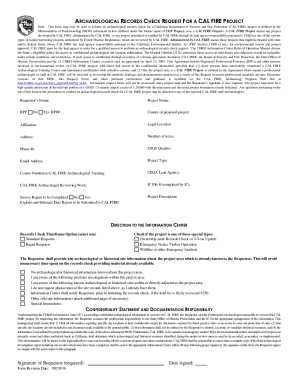
Filling out the CA Archaeological Records Check Request is an essential step for initiating an archaeological records check for projects related to the California Department of Forestry and Fire Protection. This guide will provide clear, step-by-step instructions to help you complete the form accurately and efficiently.
Follow the steps to complete the online request form.
- Press the ‘Get Form’ button to access the request form and open it in the designated editor.
- Provide your name in the 'Requestor’s Name' field. This should be the name of the person submitting the request.
- Enter the name of the project in the 'Project Name' field.
- Indicate whether you are a Registered Professional Forester (RPF) by selecting 'Yes' or 'No.' If 'Yes,' include your RPF number.
- Fill in the 'County of proposed project' field with the county where the project will take place.
- In the 'Affiliation' section, provide your organization or company name.
- Specify the legal location of the project site, including relevant details that may be standardized in your region.
- Complete the 'Address' field with the address associated with the project.
- List the number of acres involved in the project.
- Provide your contact phone numbers in the 'Phone #' field.
- Specify the USGS Quad(s) relevant to the project area.
- Enter your email address in the 'Email Address' field for correspondence regarding the request.
- Select the 'Project Type' that best describes your project from the provided options.
- If you have completed CAL FIRE Archaeological Training, enter your course number(s) in the respective field.
- Specify the CEQA lead agency for the project, usually CAL FIRE, and any additional details if applicable.
- Identify the CAL FIRE archaeologist assigned to review your work, if known.
- Indicate whether a survey report will be completed and provide an estimated submission date if applicable.
- Provide a brief description of the project in the 'Project Description' section, detailing the purpose and scope.
- Choose a records check timeframe option (Standard Response or Rapid Response) that fits your needs.
- Check any applicable boxes for ownership-wide records checks, emergency notices, or special project designations as necessary.
- If you have any archaeological or historical site information related to the project area, include it in the specified sections.
- Review the confidentiality statement and ensure your understanding by signing in the designated area.
- Finally, save your changes, download the completed form, or print it for your records.
Take action now by completing your CA Archaeological Records Check Request online.
The shield design represents the duty to protect and serve, The "1885" mention and full department name are in honor of the department's history, culture and traditions and the founding of the First Board of Forestry. The Golden state was taken from the original State Fire Marshal logo.