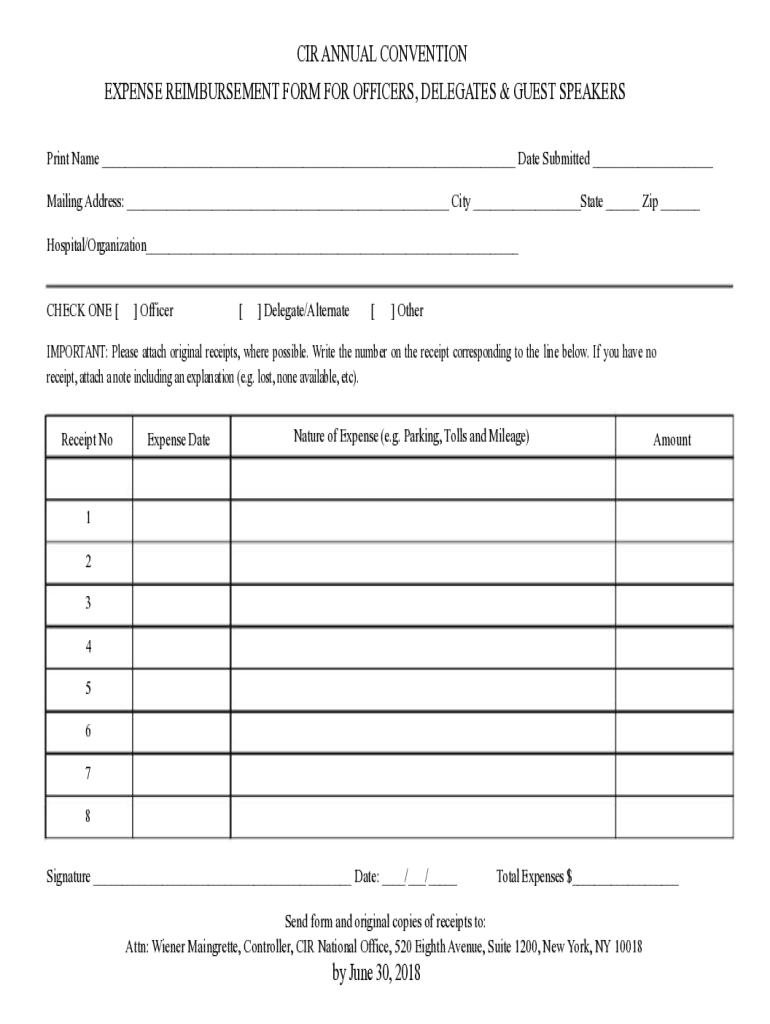
Mailing Address: City State Zip Hospital/Organization CHECK ONE Officer Delegate/Alternate Other IMPORTANT: Please attach original receipts, where possible. Write the number on the receipt corresponding to the line below. If you have no receipt, attach a note including an explanation (e.g. lost, non.

Open form follow the instructions

Easily sign the form with your finger

Send filled & signed form or save
How to fill out the 2018 Delegate Reimbursement Form online
Completing the 2018 Delegate Reimbursement Form online is a straightforward process designed to facilitate smooth submission of reimbursement requests for delegates, officers, and guest speakers. This guide will provide you with step-by-step instructions to ensure your form is accurately filled out and submitted.
Follow the steps to complete your reimbursement form successfully.
- Click ‘Get Form’ button to obtain the form and open it in your preferred editing tool.
- Enter your full name in the designated area at the top of the form. Ensure it is spelled correctly, as this will be associated with your reimbursement request.
- Provide the date you are submitting the form in the specified field.
- Fill in your mailing address, including city, state, and zip code, to ensure correspondence is directed appropriately.
- Indicate your affiliation by checking one of the boxes: Officer, Delegate/Alternate, or Other.
- Important: Attach original receipts to the form, where possible. If there are no receipts, include a note explaining the situation.
- For each expense, enter the receipt number, the date the expense was incurred, a brief description of the nature of the expense (e.g. Parking, Tolls, and Mileage), and the total amount for each expense line.
- Sign and date the form where indicated to validate your reimbursement request.
- Calculate the total expenses and enter this amount in the designated space at the bottom of the form.
- Finally, send the completed form along with original copies of your receipts to the specified address by June 30, 2018.
Take action now and complete your reimbursement document online.
Experience a faster way to fill out and sign forms on the web. Access the most extensive library of templates available.
Related content
will be reimbursed for their travel expenses;; are expected to attend the House of...
Requirements to be eligible for tuition reimbursement: 1. Complete and submit this form to...
Mar 9, 2018 — Announcement Date, 3/9/2018 ; Title, Increased Delegation of Authority to...
Get answers to your most pressing questions about US Legal Forms API.
How to create a reimbursement form?
How To Write Step 1 – Enter Employee Information. Your company may handle reimbursement forms from multiple employees. ... Step 2 – Enter Reimbursement Details. ... Step 3 – Attach Receipts and Documentation. ... Step 4 – Declare the Form's Accuracy. ... Step 5 – Secure Supervisor Approval. ... Step 6 – Submit to the Finance Department.
How do you document reimbursement?
At the minimum, your reimbursement should include two documents: an itemized receipt and back-up documentation for the purpose of purchase (event flyer, meeting email invitation, etc.).
What is the reimbursement form?
An expense reimbursement form is submitted by employees whenever they need to be reimbursed for expenses that they paid for themselves on the company's behalf. Expenses noted on the form may include office supplies, travel, accommodations, etc.
How do I write a reimbursement form?
Reimbursement form of a business trip will have different information as requirements. Details will include the date the business trip took place, what categories are requested for reimbursement, invoices, billing receipts and payment proof.
How do you write reimbursement?
Key Elements of a Reimbursement Letter/Email Subject Line. The subject line is like the crow's nest of our ship – the first thing that's spotted from a distance. ... Recipient's Details. ... Purpose Statement. ... Detailed Breakdown of Expenses. ... Documentation and Proof. ... Total Amount. ... A Call to Action. ... General Reimbursement Letter.
How do you write a reimbursement policy?
How to create an expense reimbursement policy Determine reimbursable expenses. ... List reimbursable expenses. ... Set up non-accountable plan expenses. ... Outline pre-approval process. ... Choose an expense reporting process. ... Create a reporting process & deadline. ... Build your reimbursement. ... Prepare for disputes.
Use professional pre-built templates to fill in and sign documents online faster. Get access to thousands of forms.
If you believe that this page should be taken down, please follow our DMCA take down process here.