Loading
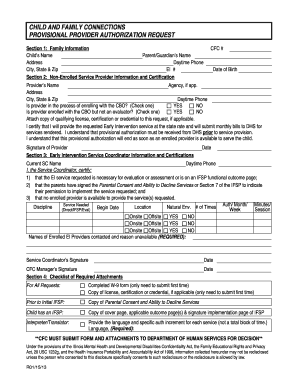
Get Child And Family Connections Provisional Provider Authorization Request - Dhs State Il
How it works
-

Open form follow the instructions
-

Easily sign the form with your finger
-

Send filled & signed form or save
How to fill out the Child And Family Connections Provisional Provider Authorization Request - Dhs State Il online
This guide provides a clear and supportive pathway for users navigating the process of completing the Child And Family Connections Provisional Provider Authorization Request online. By following these instructions, individuals can ensure that they accurately provide the necessary information and attach relevant documents for the authorization request.
Follow the steps to complete your authorization request effectively.
- Click ‘Get Form’ button to obtain the form and open it in the editor.
- In Section 1, provide the family information, including the child's name, parent or guardian's name, address, daytime phone number, city, state, and zip code. Also, include the child's Early Intervention (EI) number.
- Section 2 requires non-enrolled service provider information. Fill in the CFC number, date of birth, provider's name, agency (if applicable), address, city, state, zip code, and daytime phone number. Indicate if the provider is in the process of enrolling with the Community-Based Organization (CBO) or if they are enrolled but not an evaluator by checking the appropriate box.
- Attach a copy of the qualifying license, certification, or credential if applicable. Confirm your commitment to providing the requested Early Intervention service at state rates and your understanding of the provisional authorization process by signing the designated area.
- In Section 3, provide the Early Intervention Service Coordinator's information, including their name, daytime phone number, and the date. The service coordinator must certify that the requested service is necessary and that consent has been obtained from the parents.
- List the specific services needed, including the discipline, location, the start date, and the number of times authorized per week. Note if the service is onsite or offsite and check the appropriate boxes.
- Document the names of any enrolled EI providers contacted and the reasons for their unavailability. The service coordinator must sign and date this section.
- In Section 4, review the checklist of required attachments. Ensure the completed W-9 form and any relevant licenses, certifications, or parental consent documents are included.
- After ensuring all sections are complete and necessary attachments are included, users can save changes, download, print, or share the form as needed.
Take the next step to complete your Child And Family Connections Provisional Provider Authorization Request online today.
Related links form
Industry-leading security and compliance
US Legal Forms protects your data by complying with industry-specific security standards.
-
In businnes since 199725+ years providing professional legal documents.
-
Accredited businessGuarantees that a business meets BBB accreditation standards in the US and Canada.
-
Secured by BraintreeValidated Level 1 PCI DSS compliant payment gateway that accepts most major credit and debit card brands from across the globe.