Loading
Get Meridian Form 30 2022-2026
How it works
-

Open form follow the instructions
-

Easily sign the form with your finger
-

Send filled & signed form or save
How to fill out the Meridian Form 30 online
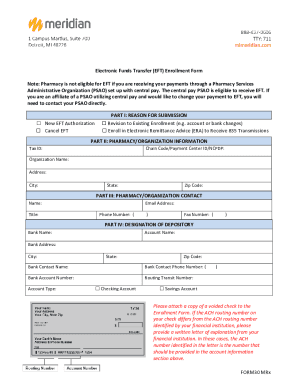
The Meridian Form 30 is an important document for electronic funds transfer enrollment. This guide will walk you through each section of the form to ensure a smooth and accurate completion.
Follow the steps to fill out the Meridian Form 30 successfully.
- Click the ‘Get Form’ button to obtain the Meridian Form 30 and open it in your selected editor.
- Begin by filling out Part I: Reason for Submission. Select one of the options provided, such as 'New EFT Authorization' or 'Cancel EFT,' to indicate your request.
- Proceed to Part II: Pharmacy/Organization Information. Enter the relevant details, including your Tax ID, Chain Code/Payment Center ID/NCPDP, Organization Name, Address, City, State, and Zip Code.
- In Part III: Pharmacy/Organization Contact, provide the contact person's Name, Title, Email Address, Phone Number, and Fax Number.
- Complete Part IV: Designation of Depository by filling out Bank Name, Account Name, Bank Address, City, State, Zip Code, Bank Contact Name, Bank Contact Phone Number, Bank Account Number, Routing Transit Number, and select the Account Type as either Checking Account or Savings Account. Remember to attach a copy of a voided check.
- If applicable, fill out Part V: Electronic Remittance Advice Information. Indicate if you would like to receive electronic remittance, and provide the necessary contact information along with your chosen delivery options.
- Read the Authorization section carefully. Ensure that the information you provided is accurate. Sign, print your name, state your title, and date the form to complete this section.
- After completing the enrollment form, you can save changes, download, print, or share the form as needed. Return completed forms and attachments by fax, email, or mail to Meridian.
Complete the Meridian Form 30 online today to streamline your electronic funds transfer process.
The Meridian Medicaid Plan is a Medicaid managed care health plan in Illinois. We connect Medicaid beneficiaries to the care that they need. Our plan is part of HealthChoice Illinois.