Loading
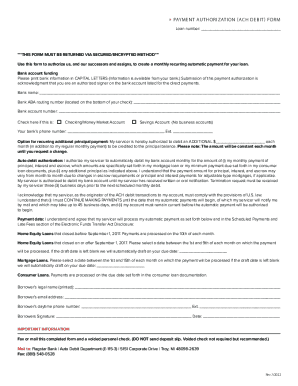
Get Flagstar Bank Payment Authorization (ach Debit) Form 2022-2026
How it works
-

Open form follow the instructions
-

Easily sign the form with your finger
-

Send filled & signed form or save
How to fill out the Flagstar Bank Payment Authorization (ACH Debit) Form online
This guide provides a clear and systematic approach to completing the Flagstar Bank Payment Authorization (ACH Debit) Form online. By following these instructions, users can ensure that all necessary information is accurately provided for successful automatic payments.
Follow the steps to fill out the form effectively.
- Click ‘Get Form’ button to obtain the form and open it in your preferred tool.
- Fill in the loan number at the top of the form. This number is essential for linking your payment authorization to your specific loan account.
- In the 'Bank account funding' section, print your bank's information in capital letters. This includes the bank name, ABA routing number, and bank account number.
- Indicate the type of account by checking either the box for 'Checking/Money Market Account' or 'Savings Account'. Note that business accounts are not accepted.
- Provide your bank’s contact number and any applicable extension. This information may be necessary for verification purposes.
- If you wish to make additional principal payments regularly, enter the specified amount in the optional section provided.
- Authorize your servicer by clearly stating your monthly payment amount, inclusive of principal, interest, and escrow.
- Review and select a payment date as instructed based on your loan type. Make note of whether payments will be processed on the 10th of the month or another specified date.
- Complete your personal information by entering your legal name, email address, and daytime phone number.
- Sign and date the form. Remember that this signature signifies your agreement to the terms outlined within the authorization.
- Submit the completed form via a secured method, either by faxing to the provided number or mailing it to the specified address.
- After submission, ensure that you save a copy for your records. Confirm your payment scheduling and terms as detailed in subsequent communications.
Complete your forms online today to manage your payments more efficiently.
How do I use the upload feature? Simply click the browse button to find the file you'd like to send to Flagstar, select the document type and hit submit. Appraisals must be in PDF (Adobe Acrobat) format. File size for TIF documents must be under 3 MB.