Loading
Get Canada Staff File Review Form - Ontario 2012-2026
How it works
-

Open form follow the instructions
-

Easily sign the form with your finger
-

Send filled & signed form or save
How to use or fill out the Canada Staff File Review Form - Ontario online
Completing the Canada Staff File Review Form - Ontario online is a straightforward process that ensures compliance with necessary regulations. This guide provides clear, step-by-step instructions tailored to support users of all experience levels.
Follow the steps to fill out the Canada Staff File Review Form successfully.
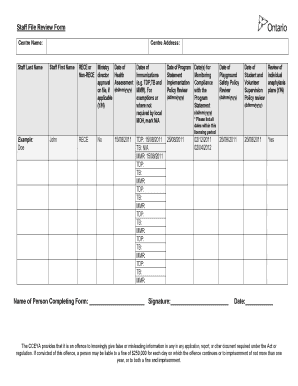
- Press the ‘Get Form’ button to access the form and open it in your online editor.
- Begin by entering the centre name in the specified field.
- Fill in the last name of the staff member in the designated section.
- Provide the centre address in the appropriate area.
- Input the first name of the staff member.
- If applicable, indicate whether there is non-registered early childhood educator (RECE) or Ministry approval on file by selecting 'Y' for yes or 'N' for no.
- Record the dates of health assessments, immunizations, and any relevant exemptions or mark them as N/A where appropriate.
- List the date of the program statement implementation review.
- Enter the date(s) for monitoring compliance with the program statement.
- Document the date of the playground safety policy review.
- Input the date of the student and volunteer supervision policy review.
- Review individual anaphylaxis plans and answer 'Y' for yes or 'N' for no.
- Complete the name of the person filling out the form and provide their signature.
- Finally, enter the date of form completion.
- Once all fields are filled out accurately, ensure to save your changes, and you can download, print, or share the form as needed.
Start filling out the Canada Staff File Review Form online today!