Loading
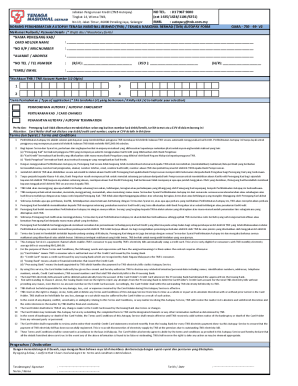
Get My Tenaga Nasional Berhad Autopay Form 2020-2025
How it works
-

Open form follow the instructions
-

Easily sign the form with your finger
-

Send filled & signed form or save
How to fill out the MY Tenaga Nasional Berhad Autopay Form online
Filling out the MY Tenaga Nasional Berhad Autopay Form online is a straightforward process that enables users to set up automatic payments for their electricity bills. This guide provides clear, step-by-step instructions to help users complete the form accurately and efficiently.
Follow the steps to complete the form online.
- Click ‘Get Form’ button to access the MY Tenaga Nasional Berhad Autopay Form and open it in your preferred editor.
- In the 'Personal Details' section, fill in all mandatory fields. Provide your name in the 'Card Holder Name' field, ensuring it matches the name on your credit card.
- Enter your identification number in the 'No K/P / NRIC NUMBER' field. This number is essential for verification purposes.
- Complete the 'Address' section by entering your current residential address accurately.
- Input your contact number in the 'TEL NUMBER' field to ensure that TNB can reach you if necessary.
- Provide your email address in the 'EMAIL' section, as this will be used for notifications regarding your Autopay services.
- Enter your 12-digit TNB account number in the designated field. It is crucial that this number is correct to avoid issues with your payments.
- In the 'Type of application' section, kindly tick (√) to indicate whether you are enrolling in Autopay, making card changes, or terminating Autopay.
- Review the terms and conditions outlined in the form. Ensure you understand them before proceeding.
- Sign and date the form at the end to confirm that you have read and agree to the terms and conditions.
- After completing the form, save your changes and download a copy for your records. You can then share the form with TNB via the designated channels.
Complete your MY Tenaga Nasional Berhad Autopay Form online today and enjoy hassle-free payments!
Besides myTNB portal and mobile app, customers can also pay their bills through other online banking platforms if they have registered their bills as a payee. Online payment through JomPAY (Biller Code: 5454, Biller Code Name: Tenaga Nasional Berhad, Ref 1: your TNB account number) is also available.
Industry-leading security and compliance
US Legal Forms protects your data by complying with industry-specific security standards.
-
In businnes since 199725+ years providing professional legal documents.
-
Accredited businessGuarantees that a business meets BBB accreditation standards in the US and Canada.
-
Secured by BraintreeValidated Level 1 PCI DSS compliant payment gateway that accepts most major credit and debit card brands from across the globe.