Loading
Get Canada Ics 224 2007-2026
How it works
-

Open form follow the instructions
-

Easily sign the form with your finger
-

Send filled & signed form or save
How to fill out the Canada ICS 224 online
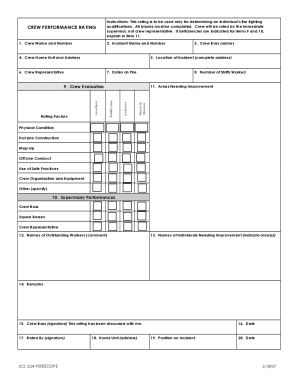
Filling out the Canada ICS 224 form accurately is crucial for assessing fire fighting qualifications. This guide will walk you through each section of the form to ensure all necessary information is correctly documented.
Follow the steps to complete the form with ease.
- Click the ‘Get Form’ button to access the form and open it in your preferred online editor.
- Enter the crew name and number in the designated fields to identify the team being rated.
- Fill in the incident name and number to correlate the performance rating with a specific event.
- Provide the complete address for the location of the incident, ensuring accuracy for record-keeping purposes.
- Document the crew home unit and address to specify where the crew is based.
- Include the name of the individual serving as the crew representative for this rating.
- Indicate the dates during which the crew was active on the fire to reflect the timeframe of service.
- Record the total number of shifts worked by the crew to evaluate their level of engagement.
- Evaluate the crew’s performance in various areas, such as physical condition and safe practices, and check the corresponding box for the rating, whether needs improvement, deficient, satisfactory, or excellent.
- Assess the supervisory performances, rating the crew boss, squad bosses, and crew representative in the same manner.
- Explain any deficiencies noted in items 9 and 10 in the areas needing improvement section, providing constructive feedback.
- List names of outstanding workers and offer comments on their exemplary performance.
- Identify individuals needing improvement and indicate the specific areas where growth is necessary.
- Write any additional remarks that may provide context or further insights into the crew’s performance.
- Ensure the crew boss signs the form to confirm that the rating has been discussed with them.
- The rater must provide their signature as a final acknowledgment of the evaluation.
- Include the current date, home unit address, and the position held on the incident to complete the form.
- After filling out all required fields, save the changes, download the form, print it, or share it as needed.
Complete your documents online today to ensure prompt processing and reliability.