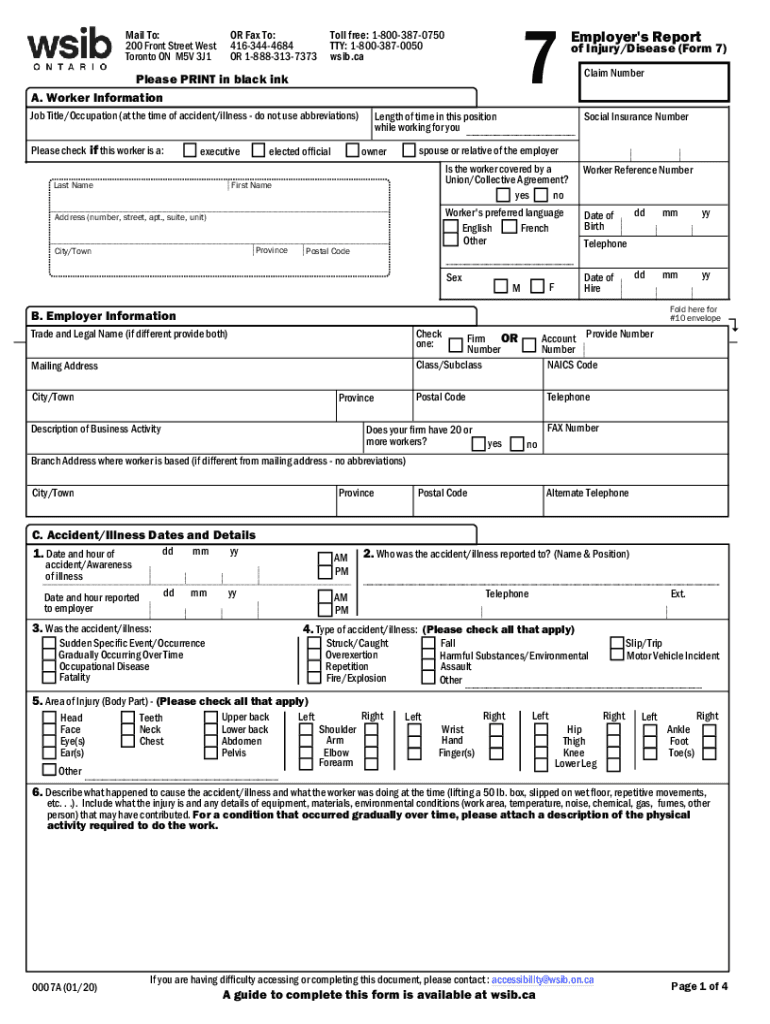
Did you know that you can securely file your Form 7 online? Our online 'form 7 ' offers a fast, effective solution for managing your Form 7 reports with the ESIB. New features in our form 7 make.
Loading

Open form follow the instructions

Easily sign the form with your finger

Send filled & signed form or save
How to fill out the Canada WSIB 7 online
Filing the Canada WSIB 7 form, crucial for reporting workplace injuries and illnesses, can be done efficiently online. This guide will walk you through each section of the form, ensuring you provide all necessary information clearly and accurately.
Follow the steps to complete the Canada WSIB 7 form online.
- Click ‘Get Form’ button to access the form and open it in the digital editor.
- In section A, provide worker information. Fill in their job title, personal details, social insurance number, and contact information. Specify their language preference and confirm if they are part of a union or collective agreement.
- Move to section B to enter employer information. Include the trade and legal names, account numbers, mailing address, and a description of the business activity.
- In section C, document the dates and details of the accident or illness. Provide the date and hour of the incident, who it was reported to, and select the type of accident or illness from the provided options.
- Continue in section C by checking the relevant areas of injury and describing the event that caused the injury or illness, including any contributing factors.
- In section D, address health care details. Note whether the worker received medical treatment, when the employer learned of this care, and where the treatment occurred.
- Proceed to section E for lost time information. Indicate whether the worker lost time and specify the details of their return to work in section F.
- Enter employment information in sections G and H regarding the worker's role, wages, and other financial specifics related to the claim.
- Complete section I concerning the work schedule, detailing the worker's normal hours and any shift patterns.
- Finish by verifying all entered information in section J, declaring the truthfulness of the provided details, and signing the report.
- Once all sections are filled out, you can save changes, download the form for your records, print it, or share it as necessary.
To file your Canada WSIB 7 form online, begin the process now and ensure your report is completed seamlessly.
Experience a faster way to fill out and sign forms on the web. Access the most extensive library of templates available.
Related content
2004 Dec;15(10):1007-19. doi: 10.1007/s10552-004-1448-7. ... 200 Front Street West...
1Institute for Work & Health, University of Toronto, Ontario, Canada. 2Department of...
Il Consiglio di sicurezza ed assicurazione sul lavoro (WSIB) ; Francese : Commissione de...
Get answers to your most pressing questions about US Legal Forms API.
What is WSIB and how does it work?
The Workplace Safety & Insurance Board is the provincial agency that provides support and insurance for workers injured on the job. Each workplace has insurance to assist workers if they get hurt while on the job. Your workplace insurance entitles you to a range of benefits.
How do I submit a WSIB Form 6?
Worker information ( i.e. name, date of birth, address) Employer information ( i.e. name, address) Accident/Illness details ( i.e. date of accident, area of injury) Health care information ( i.e. treatment date & location)
Who fills out Form 6 WSIB?
Get a Form 6. To file a claim, you must fill out a Worker's Report of Injury/Disease (Form 6) and send it to the Workplace Safety and Insurance Board (WSIB). You should do this even if your employer or doctor has already reported your injury or accident to the WSIB.
What is a Form 6 WSIB?
Often called just the Form 6, this is a WSIB form that the worker completes and sends to the Workplace Safety and Insurance Board after a work-related injury or illness. It is a way for you to tell us the details of what happened to cause the injury or illness.
What is a Form 8 for WSIB?
Health Professional's Report (Form 8) Health Professional, please use this form for: Patients who are claiming benefits under the WSIB insurance plan for an injury/illness. related to work, or. You think that the cause of your patient's injury/illness is workplace factors.
When should I file a WSIB claim?
In order to receive WSIB benefits, you must file a claim as soon as possible, and no later than six months from the date of your accident. If you have an occupational disease, the six months runs from the date you discover you have the disease and that it is work-related.
Who is responsible for WSIB?
The WSIB is an Ontario government agency. It works like this: Employers contribute to an province-wide insurance fund. Contributions (insurance premiums) are based on the employer's payroll and the accident experience in their industry.
How long do you have to fill out WSIB forms?
You must report your injury or accident to the WSIB as soon as possible and no later than 6 months after it happens. To do this, you must fill out a Worker's Report of Injury/Disease (Form 6) and send it to the WSIB.
Who fills out WSIB Form 7?
When your employer finds out about your injury, they must file the Employer's Report of Injury/Disease (Form 7) with the Workplace Safety and Insurance Board (WSIB). They have to do this within 3 business days of learning about your accident or injury.
What is a Form 7 WSIB?
The online version of our Form 7 (Report of Injury/Illness) is the fastest way to report a workplace injury or illness. The online version of the form lets you bypass pre-populated and default fields, and you'll receive an immediate confirmation of your submission and electronic notice of any status changes.
Use professional pre-built templates to fill in and sign documents online faster. Get access to thousands of forms.
If you believe that this page should be taken down, please follow our DMCA take down process here.
This form is available in several versions. Select the version you need from the drop-down list below.