Loading
Get Za Gde 01 - Gauteng Province 2021-2026
How it works
-

Open form follow the instructions
-

Easily sign the form with your finger
-

Send filled & signed form or save
How to fill out the ZA GDE 01 - Gauteng Province online
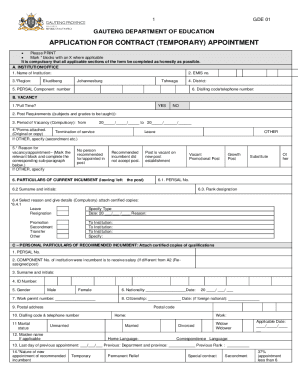
The ZA GDE 01 form is essential for individuals seeking temporary appointment contracts within the Gauteng Department of Education. This guide will provide a clear, step-by-step approach to completing the form online, ensuring that users submit accurate and complete information.
Follow the steps to successfully complete the ZA GDE 01 form online.
- Press the ‘Get Form’ button to access the application form. This will allow you to open the document in an editable format.
- Begin by filling out Section A, which pertains to the institution or office. Input the name of the institution, EMIS number, region, district, and PERSAL component number. Additionally, provide the dialling code and telephone number.
- Move on to Section B, the vacancy details. Indicate if the position is full time by selecting 'Yes' or 'No'. Complete the post requirements and the period of vacancy, clearly stating the start and end dates. Ensure to indicate if any forms are attached regarding termination of service and provide the reason for the vacancy or appointment.
- In Section C, the personal particulars of the recommended incumbent must be filled. This includes their PERSAL number, surname and initials, ID number, and gender. Additional personal details such as work permit number, nationality, citizenship, and contact information are also required. Be sure to specify the marital status and other relevant background information.
- Complete Section F where you will certify the correctness of the provided information. Print your name, sign, and date the form as an affirmation of the accuracy of your submission.
- After filling out the form, review all sections to ensure accuracy. You can save changes to the online document, download a copy for your records, or print it directly for submission.
Take the next step in your application process by completing the ZA GDE 01 form online today.
“If parents and guardians have not received an SMS, they don't need to panic as they are welcome to use their credentials to log on to gdeadmissions.gov.za and check whether they have received an offer or not.