Loading
Get Al Mvt 32-13 2017-2026
How it works
-

Open form follow the instructions
-

Easily sign the form with your finger
-

Send filled & signed form or save
How to fill out the AL MVT 32-13 online
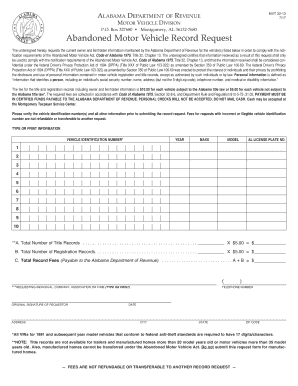
The AL MVT 32-13 form is used to request current owner and lienholder information for abandoned motor vehicles from the Alabama Department of Revenue. This guide will provide you with a clear, step-by-step process to fill out the form online effectively.
Follow the steps to complete the AL MVT 32-13 form online:
- Click the ‘Get Form’ button to obtain the AL MVT 32-13 form and open it in your form editor.
- In the first section, enter the vehicle identification number (VIN) accurately. Ensure that the VIN is legible and corresponds to the vehicle(s) you are inquiring about.
- Next, fill in the vehicle's year, make, and model in the respective fields. This information is crucial for identifying the vehicle.
- Provide the Alabama license plate number if applicable. If the vehicle does not have one, you may leave this field blank.
- Indicate the total number of title and registration records you are requesting and calculate the fees accordingly. Multiply the number of records by the respective fees listed.
- Complete the section for the requesting individual, company, association, or firm by printing or typing your name and providing an original signature.
- Fill in your address, telephone number, date, city, state, and zip code. Ensure that all information is current and accurate.
- Before submitting, verify that all vehicle identification numbers and other information are correct to avoid processing delays or issues.
- Finally, save your changes, download a copy of the form, and prepare for payment of the required fees in certified funds.
Complete your forms online today for a smooth application process!