Get Canada Imm 5444 E 2022
How it works
-

Open form follow the instructions
-

Easily sign the form with your finger
-

Send filled & signed form or save
How to fill out the Canada IMM 5444 E online
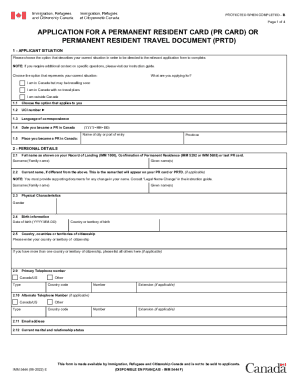
Filling out the Canada IMM 5444 E form online can seem daunting, but with this guide, you will be equipped with the necessary steps to complete it smoothly. This form is essential for applying for a permanent resident card or permanent resident travel document in Canada.
Follow the steps to fill out your application successfully.
- Click ‘Get Form’ button to obtain the form and open it in the editor.
- Choose your applicant situation by selecting the option that best describes your current status. You can indicate whether you are currently in Canada with or without travel plans, or if you are outside Canada.
- Fill in your Unique Client Identifier (UCI) number if you have one, then specify your language preference for correspondence.
- Provide the date you became a permanent resident in Canada and the location where this occurred, ensuring you format the date as YYYY-MM-DD.
- In the personal details section, enter your full name as it appears on your Record of Landing, Confirmation of Permanent Residence, or previous PR card.
- Complete the fields for your current name if it differs from what is listed above. Supporting documents are needed for any name changes.
- Provide your birth date, country of birth, and details about your citizenship.
- Input your primary telephone number and an alternate number if applicable, including the country code.
- Enter your email address and current marital status.
- In the immigration history section, answer questions regarding your previous immigration orders and any loss of permanent resident status.
- Detail your address history for the past five years or since becoming a PR, ensuring to list them from most recent to oldest.
- Document your work and educational history in a similar fashion, stating details for each position or institution.
- If you have spent time outside Canada in the past five years, provide details of those absences, including reasons for travel and ensure you categorize them appropriately.
- Complete any relevant sections regarding a lost, stolen, or damaged PR card, including any efforts made to recover it.
- Consent to disclose your history of entries into Canada and income tax information by selecting the appropriate boxes.
- In the consent and declaration section, certify that the information you have provided is correct, ensuring you sign and date the form correctly. If applicable, include the signature of a parent or legal guardian.
- Review all your information for accuracy and completeness before saving changes, downloading, printing, or sharing your form.
Take the first step towards your permanent resident card application and complete your Canada IMM 5444 E form online today.
Get form
5:50 8:00 Video Permanent Resident Card IMM 5444 - YouTube YouTube Start of suggested clip End of suggested clip If. You are using a computer you need to complete the form and print it before you can sign. Here.MoreIf. You are using a computer you need to complete the form and print it before you can sign. Here. You should only fill out Section F if your PR card was lost stolen destroyed or never received.