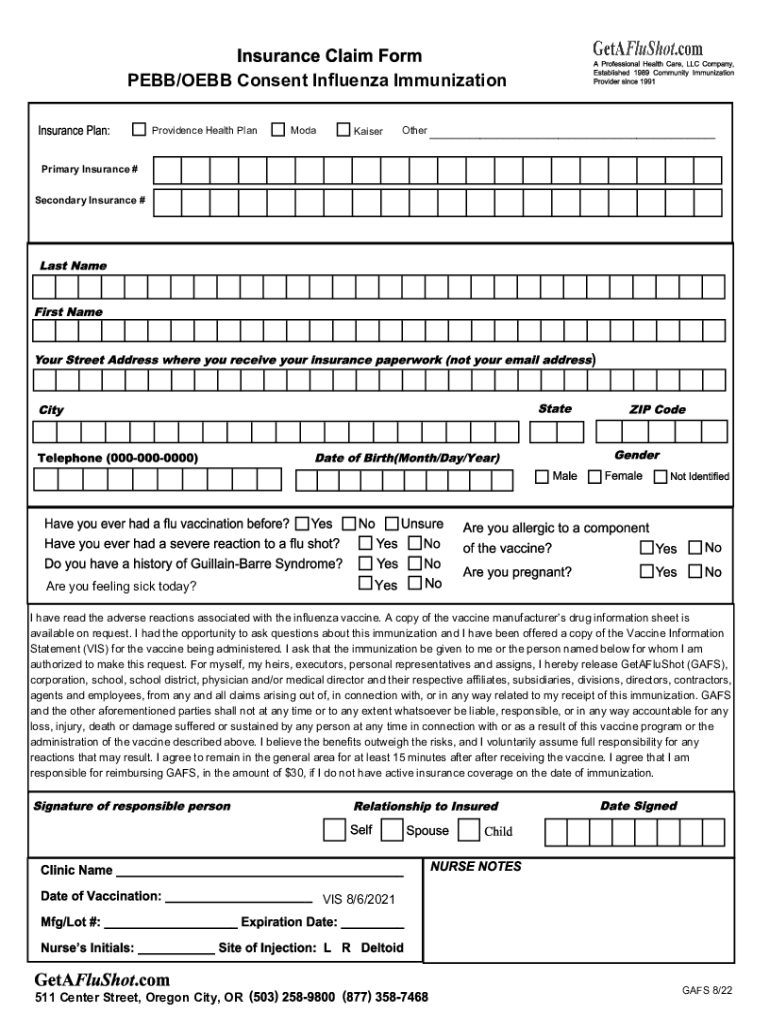
PEBB/OEBB Consent Influenza Immunization Providence Health PlanModaKaiserOther Primary Insurance # Secondary Insurance #)Are you feeling sick today? I have read the adverse reactions associated.
Loading

Open form follow the instructions

Easily sign the form with your finger

Send filled & signed form or save
How to fill out the DRAFT CONSENT FOR TREATMENT online
Filling out the DRAFT CONSENT FOR TREATMENT is an essential step in ensuring safe and informed immunization. This guide will provide you with clear, step-by-step instructions for completing the form online, making the process straightforward and user-friendly.
Follow the steps to successfully complete the form online.
- Click the ‘Get Form’ button to access the consent form and open it in your preferred browser.
- Begin by entering your primary insurance information in the designated fields, including your primary insurance company name and policy number. If applicable, provide your secondary insurance details in the corresponding sections.
- Indicate whether you are feeling sick today by selecting the appropriate option from the available choices (e.g., yes or no).
- Read the information regarding the adverse reactions associated with the influenza vaccine. Acknowledge that you have had the opportunity to ask questions and receive the Vaccine Information Statement (VIS). This ensures you are fully informed about the vaccine.
- Authorize the immunization for yourself or the individual you represent by filling in the name of the person receiving the vaccine. This indicates your consent for the treatment.
- Review the statement releasing GetAFluShot and related parties from any claims related to your immunization. This step is crucial for understanding your rights and responsibilities.
- Acknowledge that you believe the benefits of the vaccine outweigh the risks and that you voluntarily assume responsibility for any potential reactions.
- Confirm your agreement to remain in the area for at least 15 minutes after receiving the vaccine for monitoring purposes.
- If applicable, agree to reimburse GetAFluShot for any immunization costs due to lack of active insurance coverage on the date of vaccination.
- Once all fields are completed, review your entries for accuracy, then save your changes. You will have the option to download, print, or share the completed form as needed.
Start filling out your DRAFT CONSENT FOR TREATMENT online now to ensure a smooth immunization process.
Experience a faster way to fill out and sign forms on the web. Access the most extensive library of templates available.
Related content
I (patient name) give permission for [practice name] to give me medical treatment. · I...
Template for Creating an Informed Consent Letter. Note to Investigators: ... Clearly...
Sep 30, 2020 — Consent is a fundamental legal and ethical principle. All patients have...
Get answers to your most pressing questions about US Legal Forms API.
How do you draft a consent form?
All sections of the consent form, except the "Consent" section, should be written in second person ("You are invited..."). Headers should include “Informed Consent” followed by the title of the study (e.g., the header in this document). Footers should include page numbers.
Can you write your own consent form?
If you prefer to write your own consent document, you may do so, but be sure to include all required elements of informed consent.
What is consent prior to treatment?
Consent to treatment means a person must give permission before they receive any type of medical treatment, test or examination. This must be done on the basis of an explanation by a clinician.
What is consent form of treatment?
If you agree to receive all or some of the treatment options, you give your consent (agree) by signing a consent form. The completed and signed form is a legal document that lets your doctor go ahead with the treatment plan.
What is consent from a patient?
Consent is your freely given agreement to what is proposed, based on a full understanding of what is to happen. Your consent is needed for every procedure or act of care performed by doctors, nurses or other staff.
What is consent and why is it important?
Consent is an agreement between participants to engage in sexual activity. Consent should be clearly and freely communicated. A verbal and affirmative expression of consent can help both you and your partner to understand and respect each other's boundaries.
Use professional pre-built templates to fill in and sign documents online faster. Get access to thousands of forms.
If you believe that this page should be taken down, please follow our DMCA take down process here.