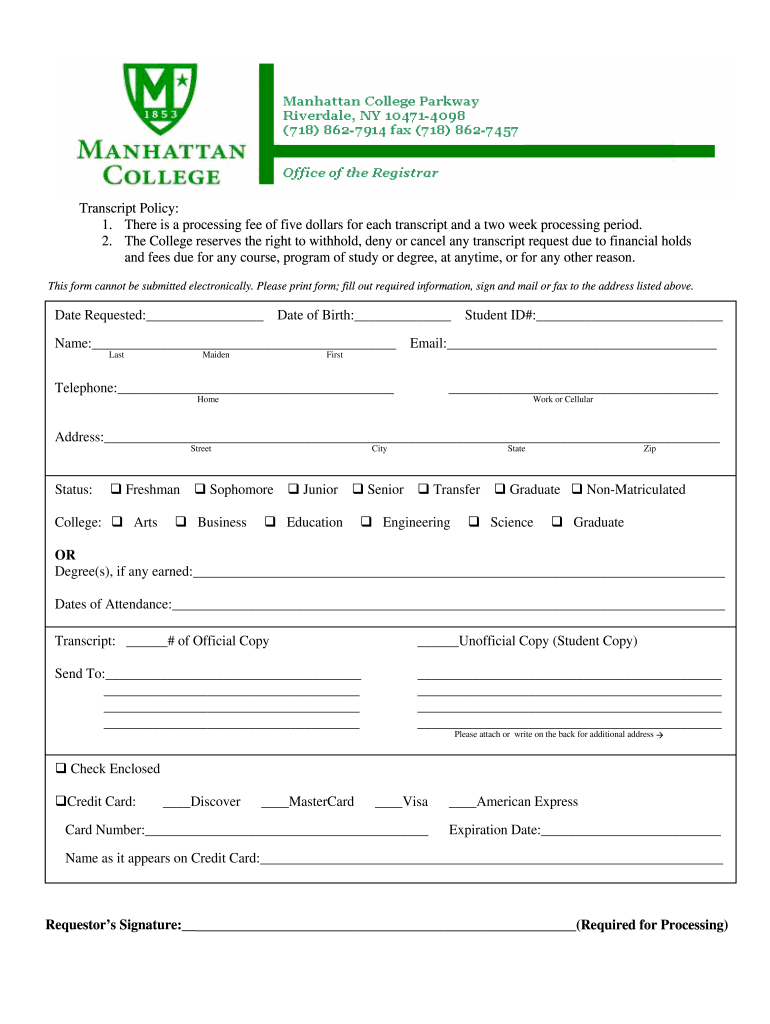
There is a processing fee of five dollars for each transcript and a two week ... reserves the right to withhold, deny or cancel any transcript request due to financial holds ... Please print form;.
Loading

Open form follow the instructions

Easily sign the form with your finger

Send filled & signed form or save
How to fill out the Manhattan College Transcript Request online
This guide provides clear instructions for users on how to fill out the Manhattan College Transcript Request form online. By following these steps, you will ensure that your transcript request is completed accurately and efficiently.
Follow the steps to fill out the transcript request form effectively.
- Click the ‘Get Form’ button to access the transcript request form and open it for editing.
- In the first section, fill in the 'Date Requested' and 'Date of Birth' fields. Ensure the dates are formatted correctly to avoid processing delays.
- Complete the 'Name' section by providing your last name, maiden name (if applicable), and 'Student ID#'. Ensure that your Student ID is accurate to prevent issues with your request.
- Fill out the 'Email' section with a valid email address where you can receive confirmations or updates regarding your transcript request.
- In the 'Telephone' section, include one telephone number (home, work, or cellular). This contact information will be used if further clarification is needed.
- Provide your current address in the designated fields, including street, city, state, and zip code. This information is essential for correctly sending your transcript.
- Indicate your current status by checking the appropriate box (e.g., Freshman, Sophomore, Junior, Senior, Transfer, Graduate, Non-Matriculated). This helps the institution understand your academic history.
- In the 'Degree(s), if any earned' section, list all degrees you have earned, as this information may be relevant to your transcript.
- Fill in the 'Dates of Attendance' section with the periods during which you were enrolled at the college.
- Specify the number of official and/or unofficial copies of the transcript you are requesting.
- Enter the address where the transcript should be sent in the 'Send To' section. Include additional addresses on a separate sheet if necessary.
- If you are paying by check or credit card, provide the relevant payment information. Include the credit card type, number, expiration date, and the name as it appears on the card.
- Finally, ensure that you sign the form in the designated area. Your signature is required for processing your request.
Complete your transcript request form online today and ensure you have all necessary documents ready.
Experience a faster way to fill out and sign forms on the web. Access the most extensive library of templates available.
Related content
To request a copy of a student's transcript for the purposes of enrollment verification:...
Order a Transcript ... The most efficient way to order your transcript is through...
A copy of high school diploma, GED Certificate, or official transcript (high school...
Get answers to your most pressing questions about US Legal Forms API.
How can I get my high school transcript NYC?
To obtain a copy of your High School Transcript, contact the school district from which you graduated. Enclose a certified check or money order payable to the New York State Education Department: $4.00 for a copy of a transcript (only passing transcripts result in a diploma) $10.00 for copy of diploma and transcript.
How long does it take to send transcripts electronically?
If the school accepts electronic transcripts, it may take 24 to 48 hours. If a hard copy is required, it can take a few days to be received. If the schools are on each coast, it could take over a week. Students should also consider how long it may take your program to confirm receipt of your transcript.
How can I get a PDF copy of my transcript?
0:01 0:57 Saving an Unofficial Transcript as a PDF - YouTube YouTube Start of suggested clip End of suggested clip Off select print transcript and instead of actually printing. Select the destination. And chooseMoreOff select print transcript and instead of actually printing. Select the destination. And choose save as PDF. This prompt may look different depending on your web browser.
How do I get my College transcripts PDF?
0:01 0:57 Saving an Unofficial Transcript as a PDF - YouTube YouTube Start of suggested clip End of suggested clip Off select print transcript and instead of actually printing. Select the destination. And chooseMoreOff select print transcript and instead of actually printing. Select the destination. And choose save as PDF. This prompt may look different depending on your web browser.
How do I request transcripts?
How to request your official transcripts. Most colleges allow you to order copies of transcripts online, by mail, or in person via the office of admissions or registrar's office. You'll complete a transcript request form, pay a small fee, and may have to provide proof of identification.
How do I request a transcript?
To get an official copy of your transcript, contact your school's registrar. In most cases, you don't even have to call or go in person; the registrar's office may have an online form for requesting your transcript.
Can an official transcript be a PDF?
An official PDF transcript will be authentic and secure for a recipient regardless of which delivery method you choose.
What is the difference between paper transcript and electronic transcript?
eTranscripts are digitally certified as official using Adobe's Blue Ribbon digital certificate and are identical to the paper transcripts. A printed and mailed official transcript is printed on security paper and mailed in an envelope with the registrar's stamp over the seal.
How do I get my high school transcripts in Texas?
If you graduated from high school, contact the school district from which you graduated to request your diploma and transcript.
How do I get my transcripts from Manhattan College?
Transcripts can be ordered by letter, on-line (http://.getmytranscript.com ), or in person from the Office of the Registrar.
Use professional pre-built templates to fill in and sign documents online faster. Get access to thousands of forms.
If you believe that this page should be taken down, please follow our DMCA take down process here.