Loading
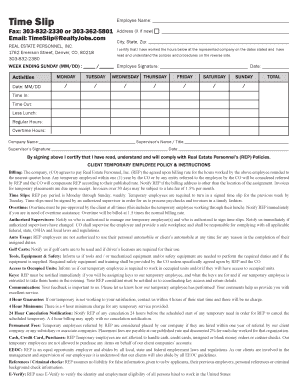
Get Fax: 303-832-2330 Or 303-362-5801
How it works
-

Open form follow the instructions
-

Easily sign the form with your finger
-

Send filled & signed form or save
How to fill out the Fax: 303-832-2330 Or 303-362-5801 online
This guide provides clear instructions on how to fill out the Fax: 303-832-2330 or 303-362-5801 form online. It will walk you through each section of the form, ensuring you complete it accurately and efficiently.
Follow the steps to complete the form accurately.
- Use the ‘Get Form’ button to access the form and open it in your preferred online editor.
- Begin by entering your employee name at the top of the form where indicated. Ensure your name is spelled correctly.
- In the given field, provide the fax numbers: 303-832-2330 or 303-362-5801. This section is crucial for returning the completed form.
- Fill in your email address as TimeSlip@RealtyJobs.com, ensuring it's accurate for any correspondence.
- Complete the 'Address' section by marking 'X' if the address is new and filling in your current address details like city, state, and zip code.
- Input the week ending date in the format MM/DD to indicate the end of the pay period.
- Affirm your work hours by signing and dating the 'Employee Signature' section to validate your submission.
- Document your daily activities throughout the week, entering dates and hours worked under the corresponding weekday sections.
- Calculate and fill in total hours, including time in, time out, regular hours, and any overtime hours worked.
- At the end of the form, provide the company name and the supervisor’s details, including name, title, signature, and date.
- After reviewing the completed form for accuracy, you can save your changes, download it, print a copy for your records, or share it as needed.
Complete your documents online for timely processing.
In Tennessee, you can ask for dismissal of an existing order of protection by filing a simple one-page form with the county clerk for your jurisdiction. There is no charge.