Loading
Get Ssa-1696-sup1 2019-2026
How it works
-

Open form follow the instructions
-

Easily sign the form with your finger
-

Send filled & signed form or save
How to fill out the SSA-1696-SUP1 online
This guide provides a clear and supportive overview for users on how to complete the SSA-1696-SUP1 form online. It offers step-by-step instructions tailored to meet your needs, ensuring ease of access and understanding.
Follow the steps to complete the SSA-1696-SUP1 form online.
- Click ‘Get Form’ button to obtain the form and open it in the online editor.
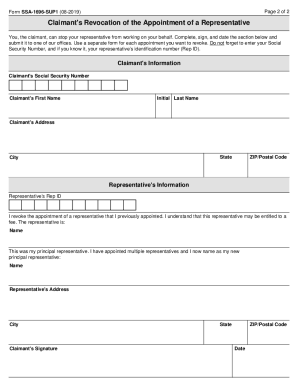
- Provide your claimant's information, including Social Security Number, first name, initial, last name, address, state, city, and ZIP/postal code.
- Enter your representative's identification number (Rep ID) if known, along with their name and address.
- Indicate that you are revoking the appointment of a representative by checking the relevant box.
- If the representative you are revoking was your principal representative, select the option to name a new principal representative and provide their name.
- Sign and date the form to confirm the revocation of the appointment.
- Once all information is completed, you can save changes, download, print, or share the form as needed.
Complete your SSA-1696-SUP1 form online today for a seamless experience.
If you are found by the court to be in breach of the lease, the court could order you to pay damages, legal costs and/or ask you to put right any breach if it is possible to do so. The landlord may also seek possession of your flat which is also referred to as forfeiture.