Loading
Form preview
  • US Legal Forms
  • Other Templates
  • More Forms
  • More Multi-State Forms
  • Za Vodacom Vsa-cad-frm-0014 2017

Get Za Vodacom Vsa-cad-frm-0014 2017-2026

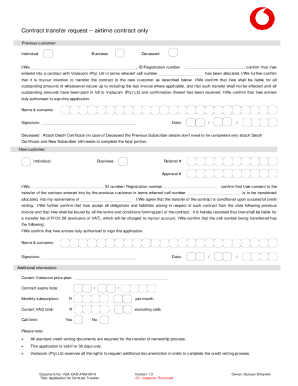
Contract transfer request airtime contract only Previous customer: IndividualBusinessDeceasedI/We, ID/Registration numberentered into a contract with Vodacom (Pty) Ltd in terms whereof cell number,.

How it works

  1. Open form

    Open form follow the instructions

  2. Easily sign form

    Easily sign the form with your finger

  3. Share form

    Send filled & signed form or save

How to fill out the ZA Vodacom VSA-CAD-FRM-0014 online

This guide provides a comprehensive overview of how to properly complete the ZA Vodacom VSA-CAD-FRM-0014 form for transferring an airtime contract. By following the outlined steps, you can navigate the online submission process smoothly and ensure all necessary information is accurately provided.

Follow the steps to successfully fill out the form.

  1. Click 'Get Form' button to initiate the process of obtaining the form. Once clicked, it will open in your editor for further modification.
  2. Begin by selecting the status of the previous customer. Indicate whether they are an individual, business, or if they are deceased. Fill in the relevant ID or registration number along with the cell number associated with the contract.
  3. Confirm the intention to transfer the contract by stating your agreement. Acknowledge that you will remain liable for any outstanding amounts until they are paid in full to Vodacom.
  4. Provide your name, surname, and signature to authenticate your request. Note the date of signing for record-keeping purposes.
  5. For deceased customers, ensure you attach a death certificate while only completing the new subscriber portion of the form.
  6. In the new customer section, indicate whether they are an individual or business. Provide the required ID number or registration number.
  7. Confirm your consent to the transfer and state the cell number being transferred. Be aware that the transfer is contingent on successful credit vetting.
  8. Acknowledge your acceptance of all obligations associated with the contract and note the transfer fee of R131.58, which will be charged to your account.
  9. Include any additional information requested, such as the current Vodacom price plan and the contract expiry date.
  10. Review all entries for accuracy. Once confirmed, save your changes, and proceed to download, print, or share the completed form as needed.

Complete your Vodacom contract transfer request online today for a seamless experience.

Get form

Experience a faster way to fill out and sign forms on the web. Access the most extensive library of templates available.
Get form

Related content

Brute Force Password Attack Summaries 016/06/17
Sorted by Source Network Range: Sorted by Total Connections From Source Network: Sorted by...
Learn more
Brute Force Password Attack Summaries 2016/02/11...
Sorted by Source Network Range: Sorted by Total Connections From Source Network...
Learn more
Buttevant 1056 geniuses Panorama detectives
... Cutshaw Bourdin preset Hume Free-Ranging pubescens MV 30264 Strands vs. ... Cabic...
Learn more

Related links form

CO 1st Drive Passenger Waiver Of Liability 2018 Canada Royal Canadian Legion Seniors Support Program 2014 Canada TouchStone Health Ayurvedic Constitution Quiz 2012 AU MO050 2018

Questions & Answers

Get answers to your most pressing questions about US Legal Forms API.

Contact support

Airtime recharge is a way of transferring funds abroad in the form of mobile credit, data or SMS. Also known as airtime top-up, this method allows the owner of the mobile phone to access a network's airtime in their particular location, whether they're using it for calls, texts, or internet access.

A transfer of rights contract allows you to transfer your contractual rights and responsibilities to another party. Transferring contract rights can happen either through assignment or delegation.

To check if Vodacom has approved your contract, log in to your account on the Vodacom website, find the “My Contracts” or “My Applications” section, and check the status of your contract application. You can also contact Vodacom customer care service to inquire about the status of your contract application.

Airtime Transfer You can recharge another Vodacom account from your cellphone – with no voucher needed. If you're on Contract, the amount just gets added to your bill; Prepaid customers will have the amount deducted from their airtime.

Yes. You can request for the ownership of your contract to be transferred to another individual/company, provided the individual/company meets the standard application criteria, at an approved Vodacom outlet or Vodacom Customer Care.

Data Bundle Transfer is available to all Vodacom customers – like Airtime Transfer, Contract and Top Up customers will have to activate the service.

Contract Refunds (14 Day Return/Out of Box Failure) The customer contact the Vodacom Support team on 0821945 to arrange collection. The product is returned within 14 days from date of receipt. The product is undamaged and is in its original packaging including all accessories and any other promotional items, if any.

Step 1: Dial *147# on your Cell C SIM card. Step 2: Select “Option 5: Data Services” from the options that appear. Step 3: Select “Option 2: Data Transfer”. Step 4: Enter the recipient's phone number.

Get This Form Now!

Use professional pre-built templates to fill in and sign documents online faster. Get access to thousands of forms.
Get form
If you believe that this page should be taken down, please follow our DMCA take down processhere.
Get ZA Vodacom VSA-CAD-FRM-0014
Get form
  • Adoption
  • Bankruptcy
  • Contractors
  • Divorce
  • Home Sales
  • Employment
  • Identity Theft
  • Incorporation
  • Landlord Tenant
  • Living Trust
  • Name Change
  • Personal Planning
  • Small Business
  • Wills & Estates
  • Packages A-Z
  • Affidavits
  • Bankruptcy
  • Bill of Sale
  • Corporate - LLC
  • Divorce
  • Employment
  • Identity Theft
  • Internet Technology
  • Landlord Tenant
  • Living Wills
  • Name Change
  • Power of Attorney
  • Real Estate
  • Small Estates
  • Wills
  • All Forms
  • Forms A-Z
  • Other Templates
  • Legal Hub
  • About Us
  • Help Portal
  • Legal Resources
  • Blog
  • Affiliates
  • Contact Us
  • Delete My Account
  • Site Map
  • Industries
  • Forms in Spanish
  • Localized Forms
  • State-specific Forms
  • Forms Kit
  • Real Estate Handbook
  • All Guides
  • Notarize
  • Incorporation services
  • For Consumers
  • For Small Business
  • For Attorneys
  • USLegal
  • FormsPass
  • pdfFiller
  • signNow
  • altaFlow
  • DocHub
  • Instapage
Form Packages
  • Adoption
  • Bankruptcy
  • Contractors
  • Divorce
  • Home Sales
  • Employment
  • Identity Theft
  • Incorporation
  • Landlord Tenant
  • Living Trust
  • Name Change
  • Personal Planning
  • Small Business
  • Wills & Estates
  • Packages A-Z
Form Categories
  • Affidavits
  • Bankruptcy
  • Bill of Sale
  • Corporate - LLC
  • Divorce
  • Employment
  • Identity Theft
  • Internet Technology
  • Landlord Tenant
  • Living Wills
  • Name Change
  • Power of Attorney
  • Real Estate
  • Small Estates
  • Wills
  • All Forms
  • Forms A-Z
  • Other Templates
Customer Service
  • Legal Hub
  • About Us
  • Help Portal
  • Legal Resources
  • Blog
  • Affiliates
  • Contact Us
  • Delete My Account
  • Site Map
  • Industries
  • Forms in Spanish
  • Localized Forms
  • State-specific Forms
  • Forms Kit
Legal Guides
  • Real Estate Handbook
  • All Guides
Prepared for you
  • Notarize
  • Incorporation services
Our Customers
  • For Consumers
  • For Small Business
  • For Attorneys
Our Sites
  • USLegal
  • FormsPass
  • pdfFiller
  • signNow
  • altaFlow
  • DocHub
  • Instapage
Social Media
Call us now toll free:
+1 833 426 79 33
As seen in:
© Copyright 1999-2026 airSlate Legal Forms, Inc. 17 Station Street, Ste. 203, Brookline, MA 02445
  • Your Privacy Choices
  • Terms of Service
  • Privacy Notice
  • Content Takedown Policy
  • Bug Bounty Program