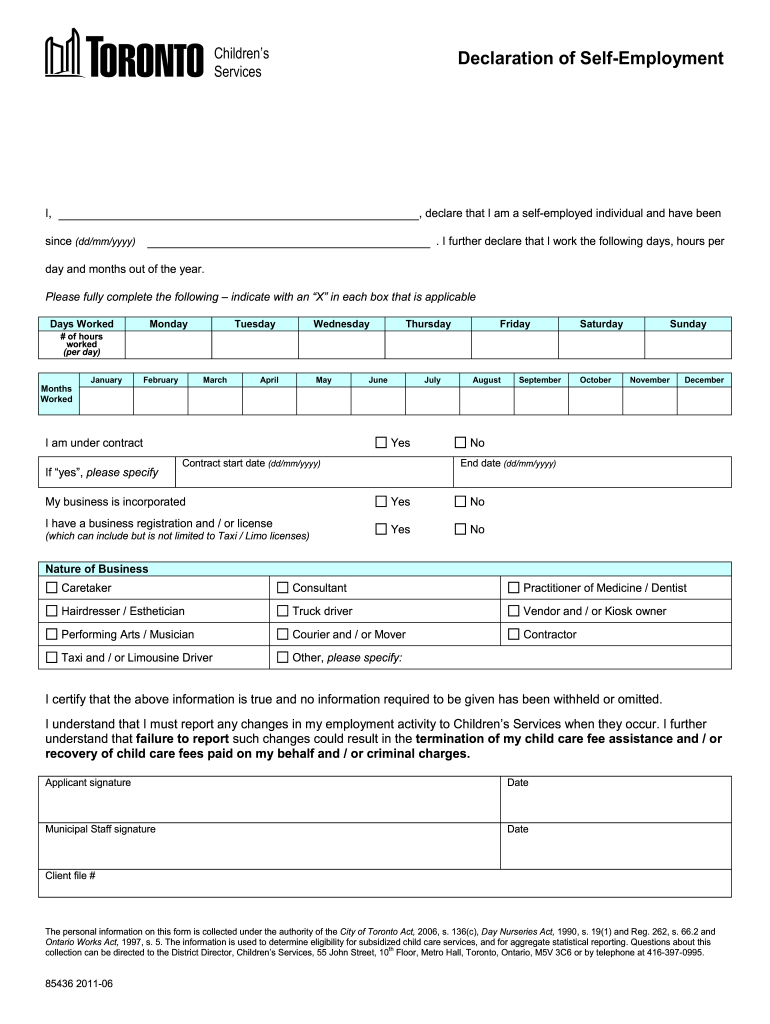
Children's Services Declaration of Reemployment I, declare that I am a self-employed individual and have been since (dd/mm/YYY). I further declare that I work the following days, hours per day and.

Open form follow the instructions

Easily sign the form with your finger

Send filled & signed form or save
How to fill out the Canada 85436 - Toronto online
Filling out the Canada 85436 - Toronto form is an important step for self-employed individuals seeking child care fee assistance. This guide provides clear and comprehensive instructions to help you complete the form accurately and efficiently.
Follow the steps to fill out the Canada 85436 - Toronto form online.
- Click ‘Get Form’ button to access the Canada 85436 form and open it in the online editor.
- Begin by entering your full name in the designated field to confirm your identity as a self-employed individual.
- Fill in the date when you became self-employed. Use the format (dd/mm/yyyy) to ensure proper documentation.
- Indicate the days and hours you work. For each day of the week, mark an 'X' in the applicable box and specify the number of hours worked each day.
- Record the months you worked by placing an 'X' in the corresponding boxes for each month of the year.
- If you are under contract, indicate 'yes' and provide the contract start date in the specified format (dd/mm/yyyy).
- Answer whether your business is incorporated and if you have a business registration or license. Mark the appropriate 'yes' or 'no' boxes.
- Specify the nature of your business by selecting one of the provided options, like caretaker, consultant, or vendor. If your business doesn't fit the listed categories, select 'Other' and specify your business type.
- Review the information entered on the form to ensure it is accurate and complete.
- Certify that the information you provided is true by signing the applicant signature section and entering the date.
- Complete any required municipal staff signature and date fields as needed.
- Once you have filled out the entire form, save any changes, and utilize the options to download, print, or share the completed form.
Complete your documents online for a seamless process.
Experience a faster way to fill out and sign forms on the web. Access the most extensive library of templates available.
Related content
Feb 24, 2023 — Toronto, Canada. Director since 2009. James S. TischI. President and...
Chen VY-J, Yang TC, Matthews SA. (2020) Exploring response and spatial heterogeneity in US...
Feb 24, 2012 — GE had $85 billion of cash and equivalents at year-end 2011. 70%...
Get answers to your most pressing questions about US Legal Forms API.
Is a notice of completion required in Tennessee?
In Tennessee, project owners (or their appointed agents) must simultaneously record and serve a notice of completion for it to be effective.
How do I enforce a lien in Tennessee?
File A Lien Parties with a direct contract with the property owner must initiate a lawsuit to enforce a mechanics lien within 1 year after the completion of the work. Parties without a direct contract with the property owner must initiate an action to enforce their lien within 90 days of the lien's filing.
How many notices is a contractor required to give before it can file a valid lien on a commercial construction project in Arkansas?
Two notices are required in Subsections 114 and 115(b) of the ACA. First, subcontractors and material suppliers must send a notice to the owner 10 days prior to filing a lien, and this notice must state the amount owed and the person who owes the amount (Subsection 114).
What is notice commencement?
What Is a Notice of Commencement? A Notice of Commencement is a document that establishes the formal start date of a construction project and identifies the project stakeholders, such as the property owner, lender, and general contractor.
How long do you have to file a lien in Tennessee?
File A Lien Notice of Non-Payment must be provided to the owner within 90 days of last day of the month labor and materials provided. For example, if labor was provided on April 3, then notice is provided 90 days from April 30. Separate notices are required for each month unpaid services or materials are provided.
How do I contest a lien in Tennessee?
(d) Any person desiring to contest such a lien or the reasonableness of the charges thereof may do so by filing a motion to quash or reduce the same in the circuit court of the county in which the lien was perfected, making all other parties in interest respondents thereto.
How do you put a lien on a property in Tennessee?
Lien Notation Send the completed form. Include all necessary support documentation. ... Include all fees. Lien notation fee: $11 per lien. County clerk fee: $8.50. State title fee: $5.50. Additional county fees may also apply. ... Information should be submitted to your local county clerk's office.
How long does a contractor have to file a lien in Tennessee?
All prime and remote contractors must file their Notice of Lien within 30 days of your Notice of Completion, or their liens are extinguished. Tenn. Code Ann. § 66-11-143(e)(2)(B).
Is a Notice of Commencement required in Tennessee?
Commencement notice (Private): No. Completion notice (Private): Optional.
Use professional pre-built templates to fill in and sign documents online faster. Get access to thousands of forms.
If you believe that this page should be taken down, please follow our DMCA take down process here.